AODA compliance report 2026
Ontario businesses and non-profits with 20+ employees must file an AODA compliance report by Dec 31, 2026. 20-49 answer one question; 50+ answer six.
Ontario businesses and non-profits with 20+ employees must file an AODA compliance report by Dec 31, 2026. 20-49 answer one question; 50+ answer six.
If your business or non-profit has 20 or more employees in Ontario, you must file an Accessibility Compliance Report with the province by December 31, 2026. You file it online through Ontario’s Accessibility Compliance Reporting Portal, using a My Ontario Account.
How much you report depends on your size. With 20 to 49 employees, you answer one question about the Customer Service standard.
With 50 or more, you answer six questions covering every AODA standard that applies to you. Public websites those organizations control have also had to meet WCAG 2.0 Level AA, with limited exceptions, since January 1, 2021.
You must file even if you haven’t met every AODA obligation yet. Missing the deadline can lead to an audit, an order to file and monetary penalties.
This guide explains who must file, how to count your employees, what the report asks, how to submit it, and what happens if you miss the deadline. For background on the law itself, see our AODA overview and our guide to website accessibility laws in Canada.
- Businesses and non-profits with 20 or more employees in Ontario must file an Accessibility Compliance Report by December 31, 2026.
- The report is due even if the business or non-profit has not yet complied with all of its obligations under the AODA.
- The report must be certified by someone with the authority to legally bind the business or non-profit.
- Reports are due every three years for businesses and non-profits (on the regulation’s schedule, the deadline after December 31, 2026 will be December 31, 2029).
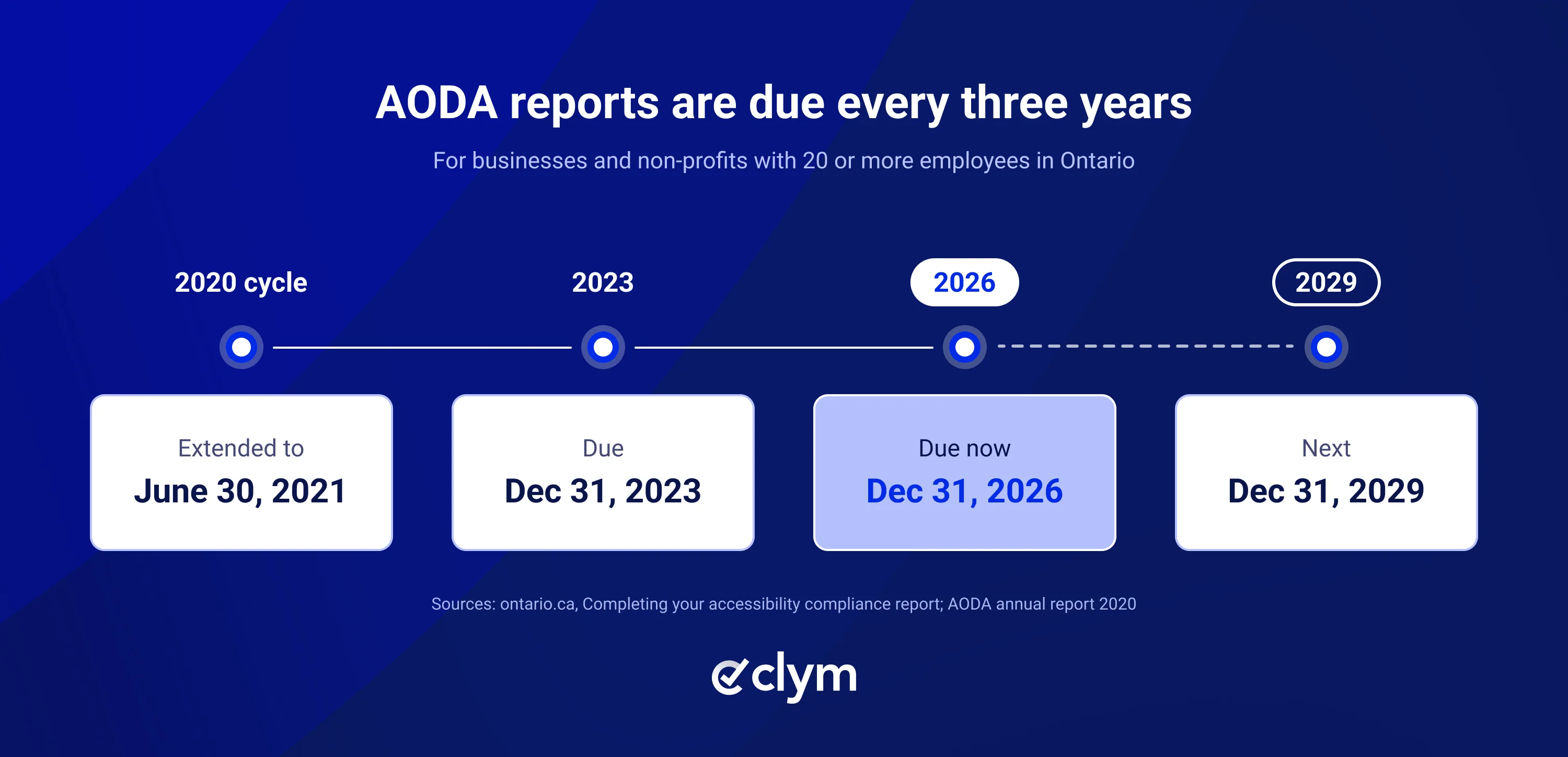
Organizations (businesses and non-profits) that have a total of 20 or more employees in Ontario must submit a report by December 31, 2026.
Ontario employees | File a report? | Covered by the business website rule? |
|---|---|---|
Fewer than 20 | No | No |
20 to 49 | Yes | No |
50 or more | Yes | Yes, subject to the scope below |
Organizations with fewer than 20 employees still must comply with the AODA requirements that apply to them.
The Accessibility Compliance Report includes:
- Six questions about accessibility compliance for businesses and non-profits with 50 or more employees
- One question, on the Customer Service standard, for businesses and non-profits with 20 to 49 employees
The number of employees to consider is the peak (highest) number of employees in Ontario at any one time in the previous twelve months. If that number is 20 or more, the business or non-profit must file a report.
The employee threshold for the website accessibility standard is different. See the website standard section below.
Count all employees, including full-time, part-time, seasonal, and contract employees. Do not count volunteers or independent contractors. Only count employees who work in Ontario.
If contract workers are employees, count them in the number of employees. Ontario’s Guide to accessibility compliance for industry recommends considering whether contract workers are employees based on:
- Whether they are paid by the organization
- Whether they perform work controlled by the organization
- Whether the organization has the right to control how the work is done
Businesses or non-profits unsure if they should count contract workers as employees are encouraged to get legal advice.
Say a business filed its Accessibility Compliance Report on December 15, 2026, with the following Ontario employees (and assume its highest count of the previous 12 months falls on one of these dates):
Snapshot | Ontario employees at one time |
|---|---|
January 31, 2026 | 18 |
June 30, 2026 | 29 |
November 16, 2026 | 18 |
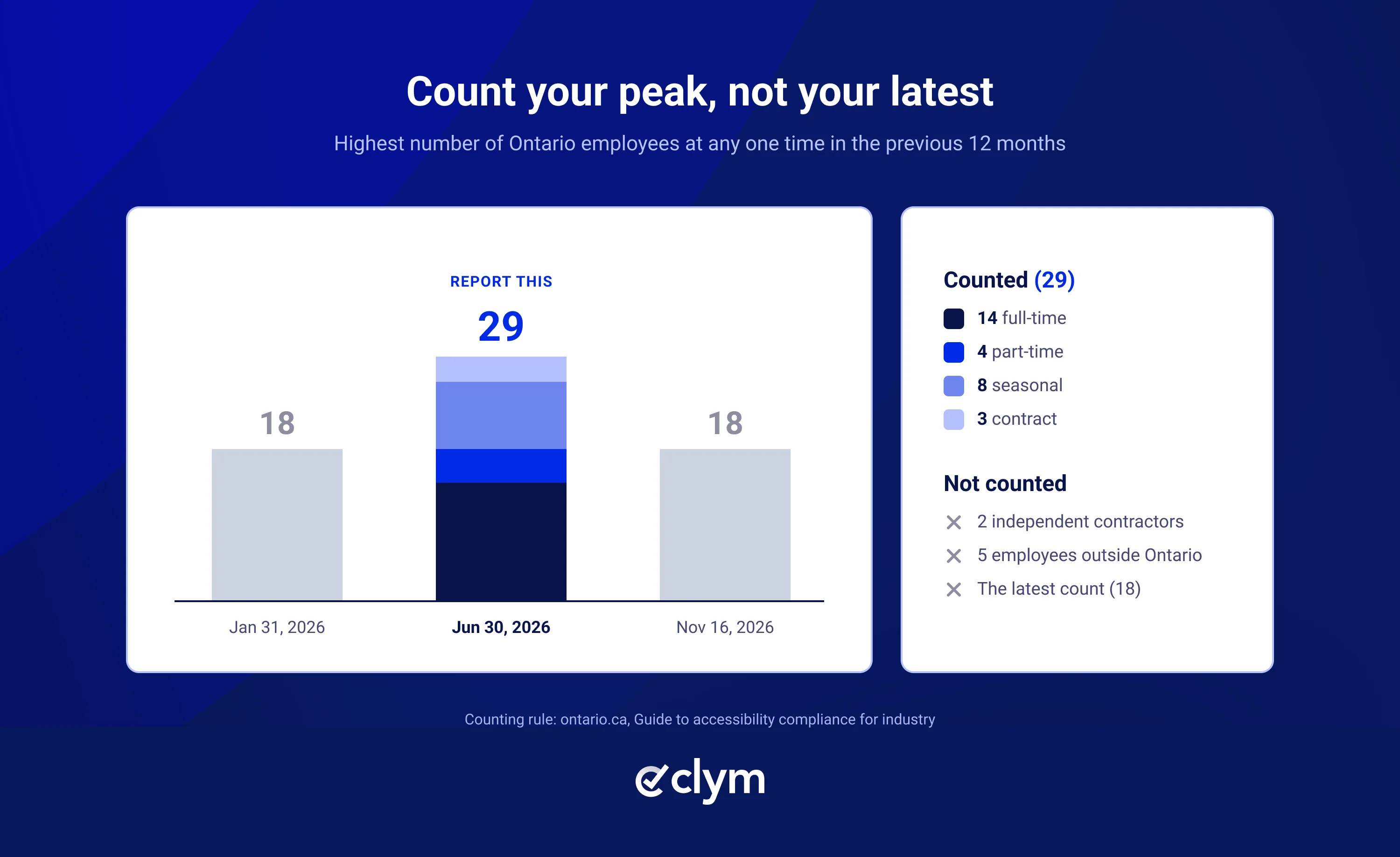
On June 30, 2026, its peak date, the business had 14 full-time, 4 part-time, 8 seasonal and 3 contract employees in Ontario. It also worked with 2 independent contractors and had 5 employees based outside Ontario. It would report 29 employees: everyone working for it in Ontario on its peak date, but not the independent contractors or the staff outside Ontario. Also note that the numbers are not added together, and the most recent number of employees (18) is not relevant.
Reports are due:
- Businesses and non-profits: every three years by December 31 (this round is due December 31, 2026; the next deadline on the regulation’s schedule is December 31, 2029)
Need help figuring out where your website stands? Check out accessibility testing and audit.
Prepare these items using Ontario’s February 2026 user guide:
Report element | What to prepare |
|---|---|
Identification | Legal name and nine-digit business number, or an AODA identifier if you have no business number |
Category and size | Organization category, Ontario employee count, and employee range |
Contacts | Certifier details and primary contact, who may be a different person |
20 to 49 employees | One compliance question, on customer-service standards only |
50 or more employees | Six compliance questions, beyond identification and contact fields |
Certification | Confirmation that required information is complete and accurate, by someone with authority to bind the organization |
Two Accessibility Compliance Reports posted online for 2026 by organizations with 50 or more employees covered:
- General
- Information and Communications
- Employment
- Transportation
- Design of Public Spaces
- Customer Service
The first Transportation question asks whether your organization directly provides, or uses a third party to provide, transportation services.
The Accessibility Compliance Report in the ministry’s 2023 example for businesses and non-profits with 50 or more employees asked about compliance with WCAG 2.0 Level AA (except for the requirements on live captioning and audio description of pre-recorded content).
The questions in those two reports are worded in line with each standard without specifically referring to websites or WCAG. Not every version of the report may be worded this way, but businesses and non-profits should keep in mind their applicable website accessibility obligations under the AODA when filling out the report.
Answer Yes or No to each question, and check off all the boxes that apply when a No answer means you are not in compliance. The transportation question is the exception: there, No just sends you to the next step. There is also a comments section for each question.
For preparation, use this optional handoff worksheet:
Field | Your entry |
|---|---|
Portal question | Copy the question |
Draft answer | Record Yes or No |
Optional record reference | Identify what supports the answer |
Optional owner | Name the person checking it |
Optional open item and next action | Record what needs work |
Businesses and non-profits that have had an accessibility audit may want to consider its results when completing the report. Where relevant, consider referring to your accessibility plan, accessibility-related policies and procedures, or employee training programs.
Someone with the authority to legally bind the business or non-profit must certify the Accessibility Compliance Report. This person certifies that the report contains all of the information that is required and that it is accurate (see section 15 of the AODA).
To test your website, Clym Accessibility Tools can help; see the product page for automated website accessibility checks and guided manual testing.
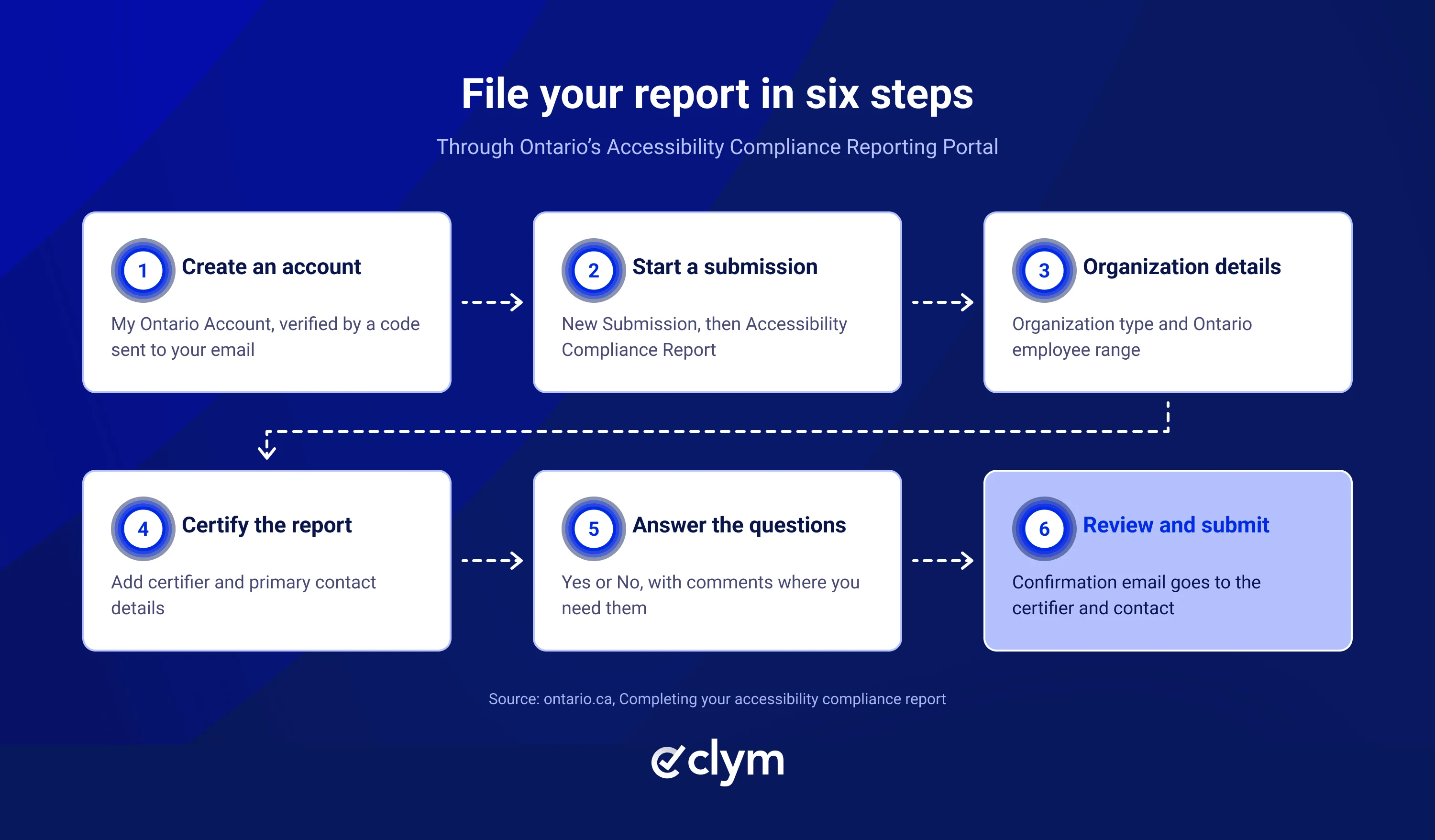
While completing the report, you can print a blank Accessibility Compliance Report to refer to, but remember that reports still need to be submitted through the portal. Here’s how:
- Create a My Ontario Account (you’ll need a valid email address and password and will be prompted to enter a verification code sent to your email address).
- Select New Submission and then Accessibility Compliance Report.
- Answer the questions about your business or non-profit, including its type and Ontario employee range.
- Complete the certification and provide certifier and primary contact information.
- Answer the accessibility compliance questions.
- Review and submit the Accessibility Compliance Report.
A confirmation email with a confirmation number will be sent to the primary contact and certifier.
You can save your Accessibility Compliance Report without submitting it. If you’re completing an Accessibility Compliance Report on behalf of someone else, you can share it with the certifier (they’ll need a My Ontario Account to view it).
From a Previous Submission, you can:
- Copy an Accessibility Compliance Report (select Action, then Copy; edit and update the copy before submitting it as a new report).
- Download an accessible PDF version of your Accessibility Compliance Report (select Action, then Print).
Once your Accessibility Compliance Report is submitted, your organization is required to make it publicly available.
For optional website follow-up, Clym’s form for reporting website accessibility challenges includes fields for where the issue is occurring, a description of the issue, and how it is affecting website visitors.
WCAG 2.0 Level AA (except for success criteria 1.2.4 Captions (Live) and 1.2.5 Audio Description (Prerecorded)) has been a requirement since January 1, 2021, for public websites operated by organizations (including businesses and non-profits) with 50 or more employees in Ontario. According to section 14 of O. Reg. 191/11, except where meeting it is not practicable, this requirement applies to:
Websites that were new or significantly refreshed as of January 1, 2014, were required to conform to WCAG 2.0 Level A as of that date. This requirement is separate from, and does not replace, the requirement that all public websites conform to WCAG 2.0 Level AA as of January 1, 2021.
WCAG refers to the Web Content Accessibility Guidelines.
Examples of factors that may be considered when determining whether it’s not practicable for your website to meet the website accessibility requirement include (but aren’t limited to):
Neither of these potential factors automatically exempts your organization from having to meet the website accessibility requirement.
According to information from the Government of Ontario, businesses and non-profits aren’t required to make their internal websites (such as intranets and extranets) conform to WCAG 2.0 Level A or AA requirements. However, if someone asks for website content in another accessible format, your organization must collaborate with them to figure out how best to meet their needs.
For businesses and non-profits, these website requirements are separate from the December 31, 2026 filing deadline.
WCAG 2.0 has 61 success criteria: 25 at Level A, 13 at Level AA and 23 at Level AAA. Ontario’s website rule for businesses and non-profits with 50 or more employees takes in every Level A and Level AA criterion except 1.2.4 and 1.2.5, which leaves 36 success criteria to meet.
The two exceptions are narrower than they sound:
How Ontario’s rule compares with newer versions of WCAG:
Standard | Level A and AA success criteria | What changes |
|---|---|---|
Ontario rule (WCAG 2.0 Level AA under s. 14(4) of O. Reg. 191/11) | 36 | WCAG 2.0 Level AA without 1.2.4 and 1.2.5 |
WCAG 2.0 Level AA | 38 | Adds live captions and prerecorded audio description |
WCAG 2.1 Level AA | 50 | Adds 12 criteria, including Reflow (1.4.10), Non-text Contrast (1.4.11), Text Spacing (1.4.12), Content on Hover or Focus (1.4.13), Label in Name (2.5.3) and Status Messages (4.1.3) |
WCAG 2.2 Level AA | 55 | Adds 6 more, including Focus Not Obscured (Minimum) (2.4.11), Target Size (Minimum) (2.5.8) and Accessible Authentication (Minimum) (3.3.8), and removes 4.1.1 Parsing |
The W3C says content that conforms to WCAG 2.1 also conforms to WCAG 2.0, and content that conforms to WCAG 2.2 also conforms to WCAG 2.0 and WCAG 2.1. A site built to WCAG 2.2 Level AA therefore also meets Ontario’s WCAG 2.0 rule, even though Ontario only requires WCAG 2.0.
Ontario’s tips for testing your website’s accessibility include:
- Using automated accessibility evaluation
- Checking your website with assistive technology (like a screen reader)
- Testing your website’s accessibility with people who have disabilities, when possible
- Getting user feedback
According to the W3C, no tool can determine on its own whether a website is accessible.
Try navigating your website (or a particular webpage or form) using only your keyboard:
- Does the focus indicator show up and is it easy to see?
- Press the Tab key to move forward through form fields. Can you get to all form fields, including the submit button?
If your website has a consent management banner or preference panel, make sure you can operate it using only a keyboard.
WebAIM’s 2026 scan of the top 1,000,000 home pages found detectable WCAG 2 failures on 95.9% of them, with an average of 56.1 errors per page. Six error types made up 96% of all errors detected:
Error type (share of home pages) | WCAG success criterion | How to check |
|---|---|---|
Low contrast text (83.9%) | 1.4.3 Contrast (Minimum), Level AA | Regular text needs a contrast ratio of at least 4.5:1 against its background, and large text needs at least 3:1 |
Missing alternative text for images (53.1%) | 1.1.1 Non-text Content, Level A | Every informative image has alt text that serves the same purpose, and decorative images are coded so screen readers can ignore them |
Missing form input labels (51%) | 1.3.1 Info and Relationships and 3.3.2 Labels or Instructions, Level A | Click each field label: the cursor should land in its field, and a screen reader should read the label aloud |
Empty links (46.3%) | 2.4.4 Link Purpose (In Context), Level A | Icon links, such as social, cart and search icons, have text a screen reader can announce |
Empty buttons (30.6%) | 4.1.2 Name, Role, Value, Level A | Icon buttons, such as menu, close and play, have an accessible name |
Missing document language (13.5%) | 3.1.1 Language of Page, Level A | The page’s html element declares its language, such as lang="en" |
These six checks cover the most common automated findings. They don’t replace a full review against all 36 success criteria that Ontario requires.
A widget complements code fixes; it doesn’t replace them. WCAG failures have to be fixed in your website’s code. A widget does a different job: it lets each visitor adjust text size, contrast, spacing and more to suit their own needs. Clym’s accessibility widget, included in every Clym plan, offers six ready-made profiles and 25+ adjustments.
On April 21, 2025, the FTC issued its final order against accessiBe.
The order bars accessiBe from claiming its widget can make any website WCAG-compliant without evidence to back it up. It isn’t a ruling against widgets themselves, so use one alongside code-level testing, not instead of it.
Need help testing your website’s accessibility? Visit accessibility testing for Canadian websites.
Ontario reminds organizations that not filing may result in enforcement action (including monetary penalties).
Legal route | Amount | Condition |
|---|---|---|
Administrative penalty, Schedule 3 | Corporations: CAD 500 to CAD 15,000 | Amount depends on impact and contravention history |
Administrative penalty, Schedule 2 | Individuals and unincorporated organizations: CAD 200 to CAD 2,000 | Amount depends on impact and contravention history |
Discretionary daily administrative penalty, O. Reg. 191/11 s. 83(1)5 | Up to CAD 100,000 for corporations; CAD 50,000 for individuals or unincorporated organizations | Both impact and contravention history must be major |
Offense fine, AODA s. 37(3) | Corporations: up to CAD 100,000; others: up to CAD 50,000, for each day or part-day the offense occurs or continues | On conviction |
If a director determines that an organization has contravened s. 14 or s. 17 of the AODA, they may issue an order under s. 21(3) of the AODA (subject to s. 21(4.1)) requiring the organization to, by a set date:
- Submit an accessibility report that complies with the requirements under the AODA
- Provide the information described in s. 17 of the AODA
- Both of the above
The director may also order, subject to s. 21(6) of the AODA, that the organization pay an administrative penalty under s. 21(3) of the AODA.
Penalty ranks for administrative penalties under the AODA (see s. 83(2) to (3) of O. Reg. 191/11):
Ranking factor | How the ranks work |
|---|---|
Impact | Impact is:
|
Contravention history | Within the current two reporting cycles period, contravention history is:
|
If an organization does not request a review or appeal, the penalty must be paid within 30 days after the order is made (unless a longer period of time is specified in the order).
Orders made by a director under s. 21, s. 25, or s. 33(8) of the AODA may be appealed to the Licence Appeal Tribunal (the tribunal designated under s. 86 of O. Reg. 191/11 for the purposes of s. 26 of the AODA) by filing a notice of appeal within 15 days after the day the order was made.
Under s. 37(1) of the AODA, it is an offense to contravene s. 20(8) or s. 37(2), provide false or misleading information in an accessibility report filed with a director (or otherwise to a director), or fail to comply with an order made by a director or the Tribunal. Failing to submit an accessibility report by the due date is not itself an offense under s. 37(1), but failing to comply with a director’s or the Tribunal’s order is.
Ontario publishes its audit and enforcement numbers in an annual report on the AODA. Read together, the reports for 2017 to 2024 (the most recent, published in December 2025) show that most audited organizations fix problems without an order, but audits happen every year and orders are issued.
Year | Audits reported by Ontario | Reported outcome | Director’s Orders |
|---|---|---|---|
1,746 compliance activities, including 1,254 Phase 1 and 476 Phase 2 audits closed | 10 of the 16 cases closed by an inspector needed no enforcement | 6, including 3 with an administrative monetary penalty | |
2,791 attestation and desk audits completed | 97% of non-compliant organizations became compliant with additional support | Not reported | |
532 attestation and 600 verification audits launched | 95% of verification audits | 21 Director’s Orders and 5 Director’s Orders with Administrative Penalty, from 172 cases escalated to an inspector | |
219 attestation and 230 verification audits launched | 96.9% of verification audits | 3, each with an administrative monetary penalty (CAD 24,000 in total) | |
445 attestation and 34 verification audits launched | 99.5% of verification audits | None | |
637 attestation and 1,013 verification audits launched | 98.8% of verification audits | Not reported as a number | |
164 attestation and 897 verification audits launched | 98.4% of verification audits | 8 | |
1,238 attestation and 807 verification audits launched | 99% of verification audits | 19, plus 1 Director’s Order with administrative penalties |
What the numbers mean for the 2026 report:
Be prepared to give the authorized certifier accurate responses to all of the questions.
Organizations with 50 or more employees should include, where applicable, whether their website meets accessibility requirements under the Information and Communications Standards (which reference WCAG), so evaluate whether your website is conformant.
File on time. Keep working to remove barriers you identify on your website.
This article is for general information and is not legal advice. Clym’s tools help you test and improve your website’s accessibility, but using them doesn’t guarantee AODA compliance, and Clym doesn’t file accessibility compliance reports on your behalf. For advice on your specific situation, consult a qualified accessibility lawyer.
Filing an Accessibility Compliance Report is not a separate certification that an organization’s website meets accessibility requirements. By submitting the report, an organization certifies that all of the information required in it has been provided and is accurate. In the two 2026 reports posted online by organizations with 50 or more employees, this includes responses about meeting (or not meeting) all requirements that apply under the Information and Communications Standards (which include the website accessibility requirement).
Accessibility statements do not replace Accessibility Compliance Reports, so provide Ontario with the information it’s asking for in the report. (And if you haven’t already published an accessibility statement, consider doing so with Clym’s automatically generated accessibility statement, which updates as your site changes)
You can report for up to 20 organizations at a time if they fall under the same:
- Size of organization (employee range)
- Type of organization
- Person certifying the report
- Answers to accessibility questions
If any of those are different, file separately.
If your organization’s number of employees (or employee range), organization information (for example, address or primary contact information), or organization status (for example, closed, fewer than 20 employees or federally regulated) changes, you must notify Ontario by updating your organization’s profile in the portal.
Federally regulated organizations are covered under the Accessible Canada Act. If you’re not sure where you stand on filing in Ontario, you can reach out to one of the contacts below.
1-866-515-2025 (toll-free) or AODA.assistance@ontario.ca

Editor
Joel is an experienced content writer and SEO specialist based in Seattle, with a strong background in data privacy, digital accessibility, and regulatory compliance. Drawing on his expertise in regulations such as GDPR, ADA, and CPRA, he creates informative, practical content that helps businesses better understand complex requirements and navigate the evolving digital compliance landscape.