Official standards and guidelines
Start with the official standards. They define the technical requirements behind most accessibility laws, policies, and testing frameworks.
W3C Web Content Accessibility Guidelines (WCAG)
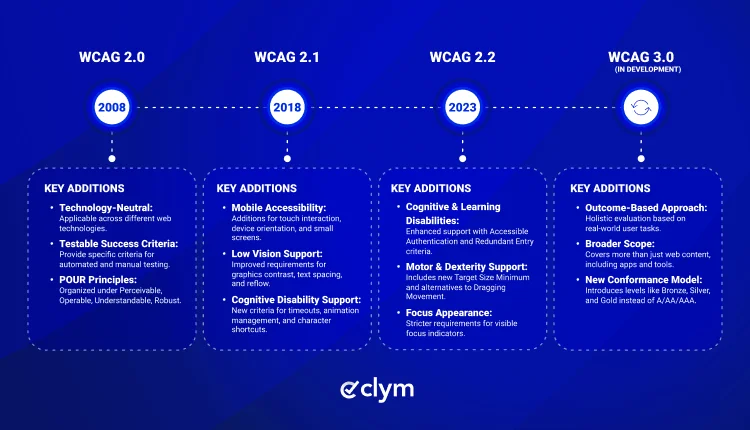
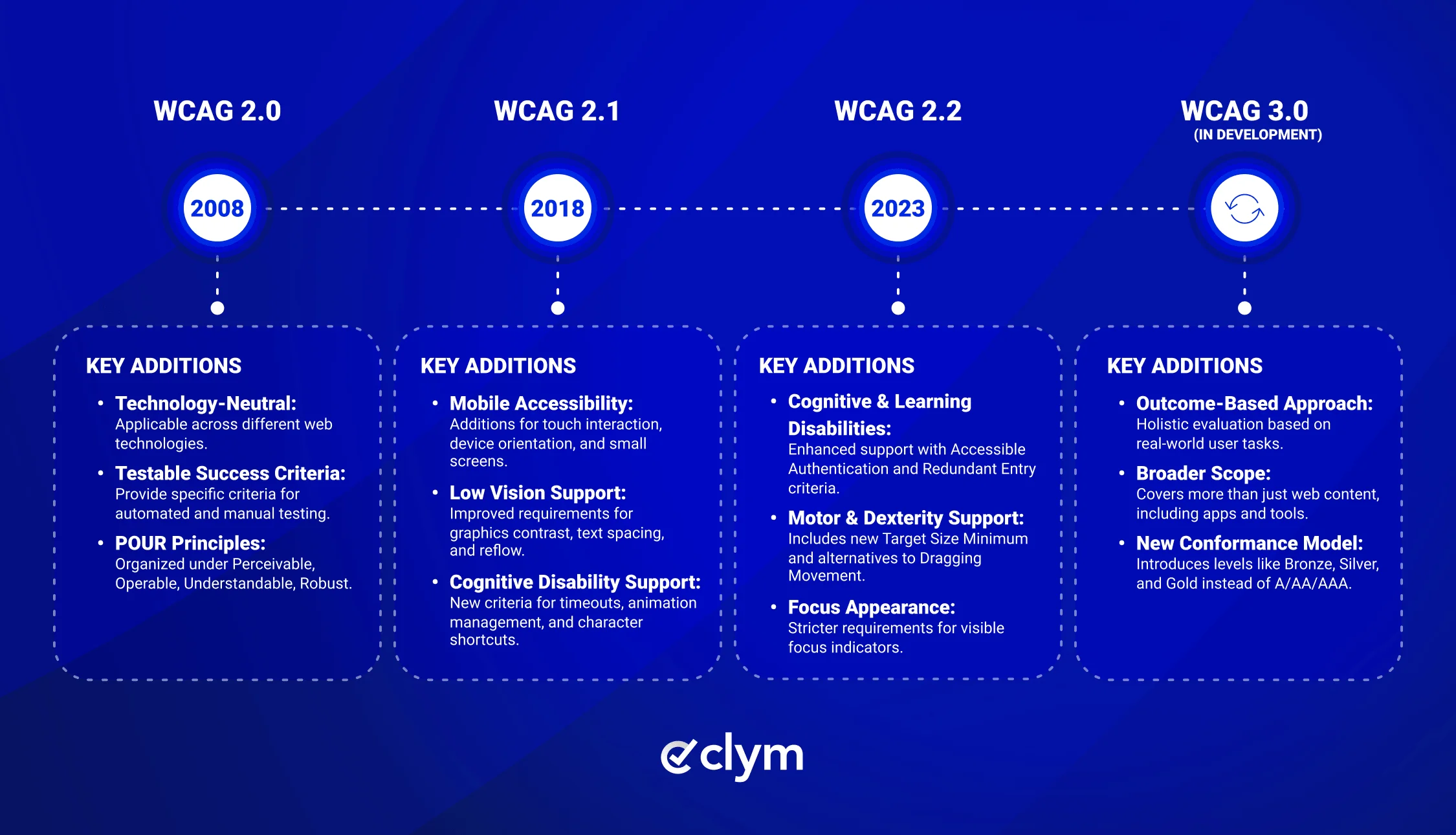
WCAG is the core technical standard used to evaluate web accessibility. It is published by the World Wide Web Consortium through its Web Accessibility Initiative. WCAG 2.2 is the latest W3C Recommendation and builds on WCAG 2.1 with additional criteria on focus, authentication, dragging, target size, and consistent help.
Many laws, policies, and technical standards still reference WCAG 2.1 Level AA, but WCAG 2.2 is increasingly used as the more current benchmark.
WCAG is organized around four principles:
- Perceivable
- Operable
- Understandable
- Robust.
It also uses three conformance levels: A, AA, and AAA. For most organizations, Level AA is the practical target. To better understand how these levels differ in practice, see our guide to WCAG A, AA, and AAA conformance levels.
W3C Web Accessibility Initiative (WAI) resource library
The WAI resource library is the practical companion to WCAG. It includes tutorials, evaluation guidance, quick references, policy resources, and plain-language explanations of accessibility concepts.
This is one of the best starting points for teams that need to understand how WCAG applies to real websites, content, forms, navigation, design patterns, and testing workflows.
Developers can use it for technical implementation guidance, while content, design, legal, and compliance teams can use it to understand accessibility requirements in a more practical way.
Clym accessibility regulation overviews and video resources
Clym’s accessibility regulation overviews can help teams understand which accessibility requirements may apply across different jurisdictions. The library covers accessibility-related laws and standards such as the European Accessibility Act, ADA Title II and Title III, AODA, EN 301 549, and other regional accessibility frameworks. Each overview is designed to give business, legal, and compliance teams a practical starting point before they move into deeper legal review, technical testing, or implementation planning.
For teams that prefer video-based learning, Clym’s YouTube accessibility playlist provides short educational videos on accessibility concepts, requirements, and practical considerations. This can be useful for onboarding non-technical stakeholders, sharing context with internal teams, or introducing accessibility topics before a deeper WCAG review.
ADA.gov accessibility guidance
The official ADA.gov website provides plain-language guidance on what the Americans with Disabilities Act requires from websites. This is especially useful for legal and compliance teams who need to understand how WCAG requirements translate into legal obligations for private businesses.
Section 508 standards
Section 508 of the Rehabilitation Act applies to federal agencies and organizations that receive federal funding. The website provides standards, policy documents, and testing guidance relevant to government contractors and federally funded organizations.
European Accessibility Act (EAA)
The EAA entered into force in June 2025 and applies to digital products and services placed on the EU market. The applicable technical standard is EN 301 549, which references WCAG 2.1 Level AA. Businesses operating in Europe or selling digital products to EU customers should review the EAA's applicability to their specific offering.
WAI-ARIA Authoring Practices
WAI-ARIA (Accessible Rich Internet Applications) is a technical specification from W3C that addresses accessibility in dynamic content and complex user interface components. Developers building interactive web applications should use the WAI-ARIA Authoring Practices Guide as a reference for accessible design patterns.
Free web accessibility testing tools
Automated testing tools can help identify many common accessibility issues on live websites and in development workflows. They do not replace manual testing or assistive technology testing, but they are a practical starting point.
WAVE Web Accessibility Evaluation Tool
WAVE, developed by WebAIM, is one of the most widely used free accessibility evaluation tools. It is available as a browser extension and as a web-based tool at wave.webaim.org. WAVE generates a visual overlay of accessibility errors, alerts, and structural elements directly on the page being tested. It is well-suited for content managers and developers who want a quick, readable report.
Clym free Accessibility Tools
Clym also offers Accessibility Tools, a free, open-source desktop application for testing, documenting, and managing web accessibility issues. With Clym Accessibility Tools, teams can run WCAG-based automated checks, follow guided manual testing steps, document issues, review remediation guidance, and generate accessibility reports in formats such as WCAG-EM, ATAG, and VPAT.
Clym Compass is a free compliance indicator that gives teams a readable overview of which data privacy and accessibility regulations may apply to their website. It checks across more than 150 regulations, helping business owners and compliance teams understand their potential obligations before moving into deeper assessment or implementation.
axe DevTools (free tier)
Developed by Deque Systems, axe is an accessibility testing engine widely used in development workflows. The free browser extension (available for Chrome and Firefox) runs in browser developer tools and reports issues with clear explanations and remediation guidance. axe is known for its low false-positive rate, which makes it practical for teams without deep accessibility expertise.
Google Lighthouse
Lighthouse is built into Google Chrome DevTools and is also available as a command-line tool. Its accessibility audit reports on a subset of WCAG criteria and is useful for tracking improvements over time. Because it is already in the browser, it requires no additional setup.
WebAIM Color Contrast Checker
Color contrast between text and background is one of the most common accessibility failures. WebAIM's contrast checker tests foreground and background color combinations against WCAG AA and AAA contrast ratios. It is a fast, single-purpose tool widely used by designers.
NVDA Screen Reader (Windows, free)
NVDA (NonVisual Desktop Access) is a free, open-source screen reader for Windows. Testing your website with a real screen reader is the most direct way to understand how users with visual impairments experience your content. VoiceOver (built into macOS and iOS) and TalkBack (Android) are the equivalent free tools on Apple and Android devices.