Ecommerce accessibility issues at holidays
Shopping websites averaged 71 accessibility errors per home page in 2026. Discover common issues and practical ways to improve your store before Black Friday.
Shopping websites averaged 71 accessibility errors per home page in 2026. Discover common issues and practical ways to improve your store before Black Friday.
Your holiday sale is live, your ads are running, and customers are visiting your website. But what happens when accessibility barriers prevent someone from completing a purchase?
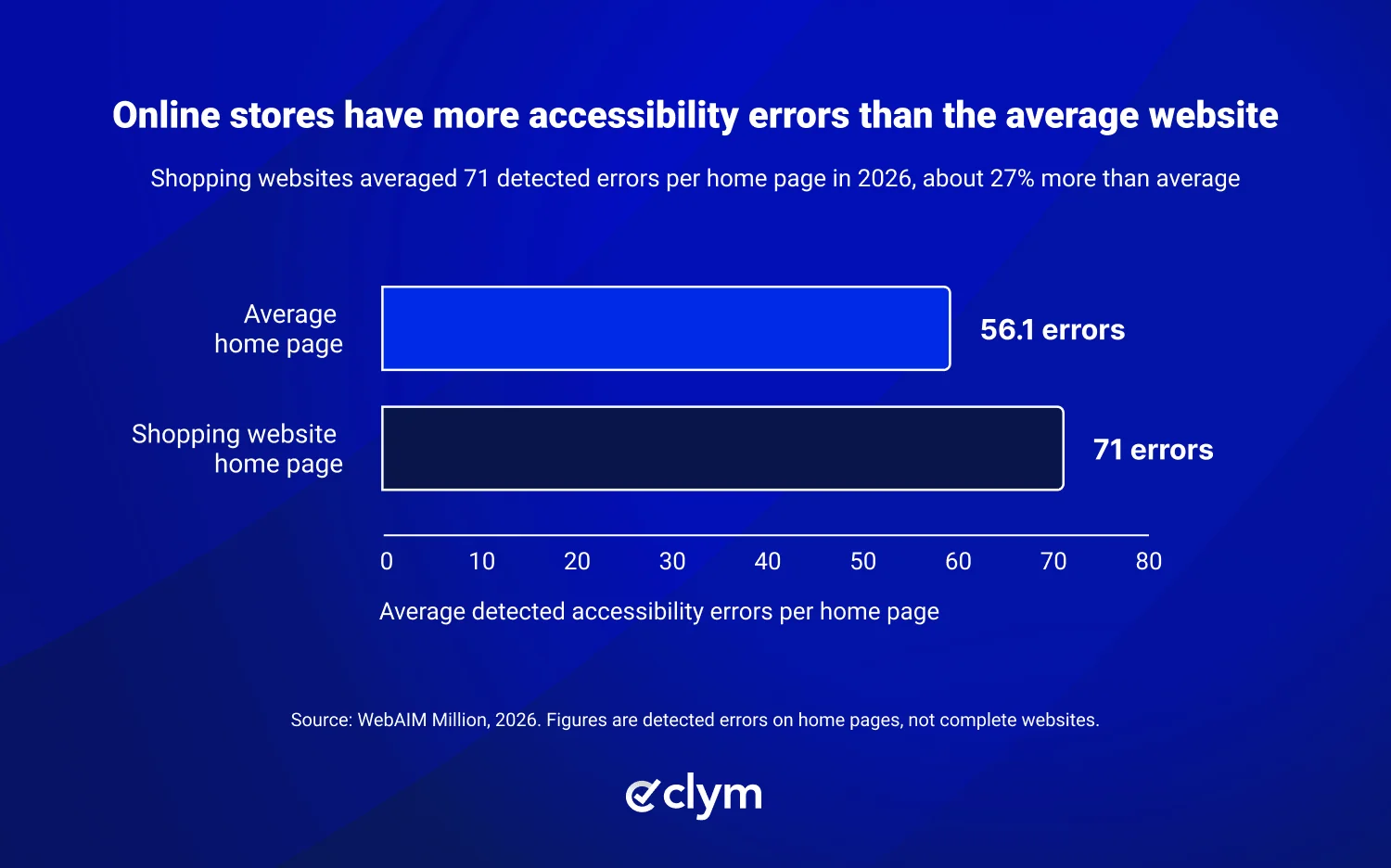
According to WebAIM's 2026 research, shopping websites averaged 71 accessibility errors per homepage, significantly more than the average website.
With US online holiday sales expected to reach $275.1 billion this year, accessibility problems could mean missed sales opportunities.
Here's a look at the most common accessibility issues on ecommerce websites and how to address them before Black Friday.
Shopping websites averaged 71 accessibility errors per homepage in 2026.
Common problems include hard-to-read text, missing image descriptions, and difficult checkout forms.
Accessibility barriers can cause shoppers to abandon purchases or choose another store.
Testing your most important pages before Black Friday can help identify problems.
Automated scans can identify common issues, but some require manual testing.
An accessible online store allows people with disabilities to browse products and complete purchases without unnecessary barriers.
That includes readable text, clear product descriptions, easy navigation, and checkout forms that work with assistive technologies.
For a closer look at how to improve your store, see our complete ecommerce accessibility guide.
The holiday shopping season brings more visitors and more competition between online stores.
Adobe forecasts $275.1 billion in US online holiday sales in 2026, with Black Friday and Cyber Monday among the busiest shopping days.
When customers struggle to read product information, navigate your website, or complete checkout, they may choose another store.
And with mobile devices expected to account for 57.4% of holiday online spending, making your website easy to use on smaller screens is especially important.
WebAIM's 2026 analysis found accessibility errors on 95.9% of the home pages tested, with an average of 56 errors per page.
Shopping websites had even more, averaging 71 accessibility errors per home page.
These issues aren't necessarily caused by the e-commerce platform itself. Website themes, plugins, third-party tools, and content can all contribute.
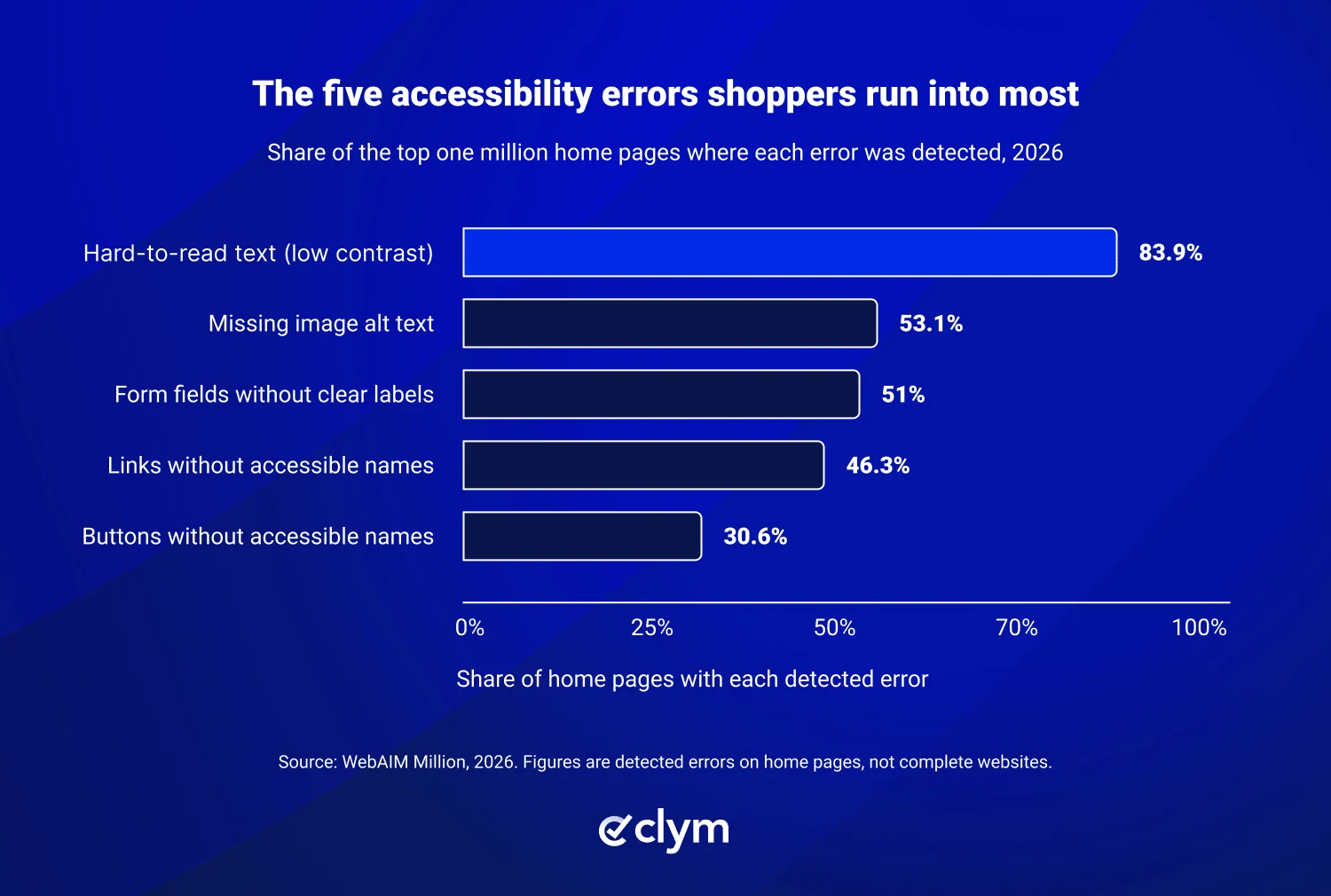
Each issue below can stop a shopper at a different point in their visit.
Accessibility issue | What happens | Where it matters |
|---|---|---|
Hard-to-read text (low contrast) | Customers struggle to read prices, offers, or delivery information. | Product pages and promotions |
Missing image descriptions (alt text) | Screen reader users may not understand what a product image shows. | Product photos |
Form fields without clear labels | Customers may struggle to complete payment or delivery details. | Checkout |
Links without accessible names | Customers can't tell where a link will take them. | Navigation and promotions |
Buttons without accessible names | Customers may not know what a button does. | Shopping cart and product pages |
These problems aren't always obvious when browsing your own website, but they can prevent customers from finding products or completing purchases.
Fortunately, testing can identify many common accessibility issues.
About 1 in 4 US adults has a disability, according to the CDC.
Some use screen readers, keyboards, or voice controls to shop online, while others benefit from features such as captions and adjustable text sizes.
Their purchasing power is significant. According to a 2026 American Institutes for Research report, working-age adults with disabilities have an estimated $674.3 billion in disposable income.
Accessibility problems can influence where customers choose to shop.
According to Fable's survey of assistive technology users:
27% abandon a purchase at least once a month because of accessibility problems.
36% choose a more accessible website even when it doesn't offer the lowest price.
When customers struggle to find products or complete checkout, they may take their business elsewhere.
"Accessibility problems aren't always visible to store owners, but they can affect whether customers complete a purchase. During the holidays, even small barriers can mean missed sales opportunities," said Mircea Patachi.
Clym's accessibility issue reporting lets visitors report problems they encounter on your website, helping your team identify barriers that automated tools might miss.
According to UsableNet, ecommerce businesses account for roughly 80% of digital accessibility lawsuits.
Addressing accessibility barriers can improve the customer experience and help businesses reduce potential legal risks.
Our article on why ecommerce retailers are hit hardest by ADA website lawsuits explains these risks in more detail.
You don't need to redesign your entire website before Black Friday.
Start with your most important pages: your home page, popular products, shopping cart, and checkout.
These seven checks can help you identify common accessibility problems before holiday traffic increases.
Check | What to do |
|---|---|
| Use your keyboard to navigate from a product page through checkout. Make sure buttons, forms, and menus work. |
| Check that important product images have descriptions that explain what they show. |
| Make sure every checkout field has a visible label that screen readers can identify. Error messages should clearly explain what needs fixing. |
| Make sure prices, offers, and buttons have enough contrast to read easily. A free contrast checker can help. |
| Check that screen readers can identify buttons such as "Add to cart" and "Close." |
| Increase browser zoom to 200% and check that content remains readable and usable. |
| Scan your most important pages to identify common accessibility issues. |
For more detailed guidance on website accessibility, refer to the WCAG 2.2 Level AA standards.
Holiday promotions often introduce new accessibility barriers.
Before launching your campaigns, check that:
Countdown timers can be paused or hidden when needed.
Pop-ups can be closed using a keyboard.
Rotating banners have a pause option.
Product names and prices aren't displayed only as text within images.
Promo codes are easy to read, copy, and enter.
Accessibility scanners can identify common problems such as missing image descriptions, low-contrast text, and buttons without accessible names.
However, they can't always confirm whether product descriptions are accurate or whether customers can complete checkout easily.
That's why combining automated scanning with manual testing is important.
For a closer look, see our guide to automated vs. manual accessibility testing.
Clym helps online retailers identify accessibility problems, collect customer feedback, and manage accessibility improvements through one platform.
Accessibility Scanner: Find common website accessibility problems and get recommendations for addressing them.
Accessibility Widget: Give visitors options to adjust how they view and interact with your website. These tools support accessibility improvements but don't replace fixes to the website itself.
Issue Reporting: Allow customers to report accessibility barriers directly.
Accessibility Statement: Communicate your accessibility efforts and give visitors a way to contact you.
Accessibility Testing and Audits: Identify additional problems through automated and manual testing.
Explore Clym's accessibility solutions for ecommerce businesses.
Holiday shoppers have plenty of options, and accessibility barriers can push them away before they complete a purchase.
You don't need to fix everything at once. Start by checking your most important pages, testing the shopping experience, and identifying common accessibility problems.
Improving accessibility can make shopping easier for more customers and help reduce unnecessary obstacles during the busiest shopping season.
Common issues include low-contrast text, missing image descriptions, unlabeled form fields, and links or buttons without accessible names. These problems can make it difficult for customers to browse products or complete checkout.
Accessibility barriers can prevent customers from finding products, understanding information, or completing purchases. Some shoppers may abandon their carts or choose a more accessible store instead.
Start by testing your product pages, shopping cart, and checkout. Check keyboard navigation, image descriptions, form labels, text contrast, and mobile usability. An automated accessibility scan can help identify additional issues.
No. Automated scanners can detect many common technical problems, but some accessibility barriers require manual testing. Combining both approaches provides a more complete understanding of your website's accessibility.
Accessibility widgets can provide helpful display and navigation options, but they don't fix every accessibility issue. Businesses should use them alongside website improvements, testing, and ongoing accessibility reviews.

Mircea is the Chief Operating Officer at Clym, where he leads operations and product strategy to help businesses navigate global data privacy, web accessibility, and transparency and accountability requirements. With a background spanning information security, technology, compliance, and business development, Mircea plays a key role in shaping Clym’s vision and guiding its expansion into new markets. When he’s not coordinating teams or refining product workflows, he is either walking somewhere, reading, sailing or learning about the latest tech innovations.