
A VPAT (Voluntary Product Accessibility Template) proves ICT accessibility. Learn the four editions, what goes inside one, and how to complete it.
What is a VPAT? The meaning, four editions, and how to complete one
Your software just cleared every stage of the sales cycle. Then the purchasing team sends one request back: provide your VPAT.
For many ICT vendors, this is where a deal stalls. A VPAT is the document that validates your product's accessibility for enterprise and government buyers. Without one, you cannot bid on US federal contracts. Without one, many enterprise procurement processes will not move forward. And with the European Accessibility Act now in effect, equivalent requirements are spreading across Europe.
This guide explains what a VPAT is, what the acronym stands for, which of the four editions to choose, and how to complete one step by step, including how to generate the final report without translating your audit results by hand.
What is a VPAT?
A VPAT, or Voluntary Product Accessibility Template, is a standardized document published by the Information Technology Industry Council (ITI) that ICT vendors use to describe how their product or service meets accessibility standards. When completed for a specific product, a VPAT becomes an Accessibility Conformance Report (ACR): the accepted global format for accessibility documentation in ICT procurement.
The VPAT meaning is straightforward: it is a structured self-declaration supported by evidence from an accessibility audit. Buyers use it to evaluate whether a product meets their accessibility requirements before purchasing. Providing an accurate, well-documented VPAT removes a common blocker in enterprise and government procurement.
The current version is VPAT 2.5, which is available in four distinct formats: Section 508 (for US federal requirements), EN 301 549 (for EU procurement), WCAG (covering WCAG 2.0, 2.1, and 2.2), and the International (INT) edition, which combines all three standards into a single document.
Who needs a VPAT?
Any organization selling software, hardware, or digital services to the following types of buyers will typically be required to provide one:
US federal agencies (required by Section 508 for all ICT procurement)
US state and local government bodies
Enterprise companies with formal accessibility procurement policies
European public sector bodies (required under the European Accessibility Act and EN 301 549)
Educational institutions and private organizations receiving federal funding
VPAT compliance is increasingly expected beyond government procurement. If you sell B2B at any significant scale, you will eventually encounter the request. Having one prepared avoids losing deals to competitors who already have documentation in place.
The four VPAT editions
There are four editions of the VPAT template, each mapping to a different accessibility standard. Choosing the right one depends on where your product is sold and what your buyer specifically requires.
VPAT editions at a glance
Edition | Standard covered | When to use it |
|---|---|---|
VPAT 2.5 508 | Section 508 (US federal) | Selling to US federal agencies or as a federal contractor |
VPAT 2.5 EU | EN 301 549 (European Union) | Selling to EU public sector bodies or under the EAA |
VPAT 2.5 WCAG | WCAG 2.0, 2.1, and 2.2 | General international procurement where no specific standard is named |
VPAT 2.5 INT | Section 508 + EN 301 549 + WCAG | Multi-jurisdiction sales or a single document covering all three |
The WCAG edition serves as the foundation for all accessibility reporting; its provisions are integrated into every other VPAT type. While you can select a specific WCAG version (such as 2.0, 2.1, or 2.2) when building your report, the VPAT type you choose adds specific regulatory layers:
- VPAT 508: Combines the WCAG foundation with specific Section 508 provisions for US federal contracts.
- VPAT EU: Combines the WCAG foundation with EN 301 549 provisions for the European market.
- VPAT INT (International): The most comprehensive option, incorporating the WCAG foundation, Section 508 provisions, and EU provisions into a single document.
Most vendors targeting US federal agencies use the 508 edition, while those selling across both the US and Europe opt for the INT edition. If a buyer has not specified a standard, the VPAT WCAG edition is the most broadly accepted for general documentation. You can download the official template or use an audit tool to generate the specific report type required by your test results.
What goes inside a VPAT
A completed VPAT has five sections. Understanding each one before you start avoids having to redo the work later.
Product description. Name, version number, and a short description of the product. If it has multiple components (web, mobile, desktop), you should note which are covered.
Evaluation methods. How the VPAT assessment was conducted. Buyers expect a combination of automated scanning, manual testing, and assistive technology testing (screen readers, keyboard-only navigation).
Applicable standards. The specific WCAG success criteria, Section 508 provisions, or EN 301 549 requirements that apply to your product's features and interfaces.
Conformance table. The main body. For each applicable criterion, you assign one of four conformance levels: Supports, Partially Supports, Does Not Support, or Not Applicable.
Remarks and explanations. Required for every criterion rated Partially Supports or Does Not Support. This is where most VPATs fall short. Vague remarks invalidate the document.
How to complete a VPAT: step by step
Here is the process in the order you should follow. Wherever Clym Accessibility Tools directly supports specific steps this will be noted.
Step 1: Choose the right edition
Identify which standard your buyer requires. US federal procurement means VPAT 2.5 508. EU public sector means VPAT 2.5 EU. If you need to cover both or want one document for multiple markets, use VPAT 2.5 INT.
Step 2: Run a thorough accessibility audit
This is where most vendors underestimate the work. A VPAT without documented audit evidence is not credible. You need to test your product against every applicable success criterion using a combination of automated scanning and guided manual testing. Automated tools reliably identify around 30 to 40% of accessibility issues. The rest require manual evaluation: keyboard navigation, screen reader behavior, focus management, and logical reading order.
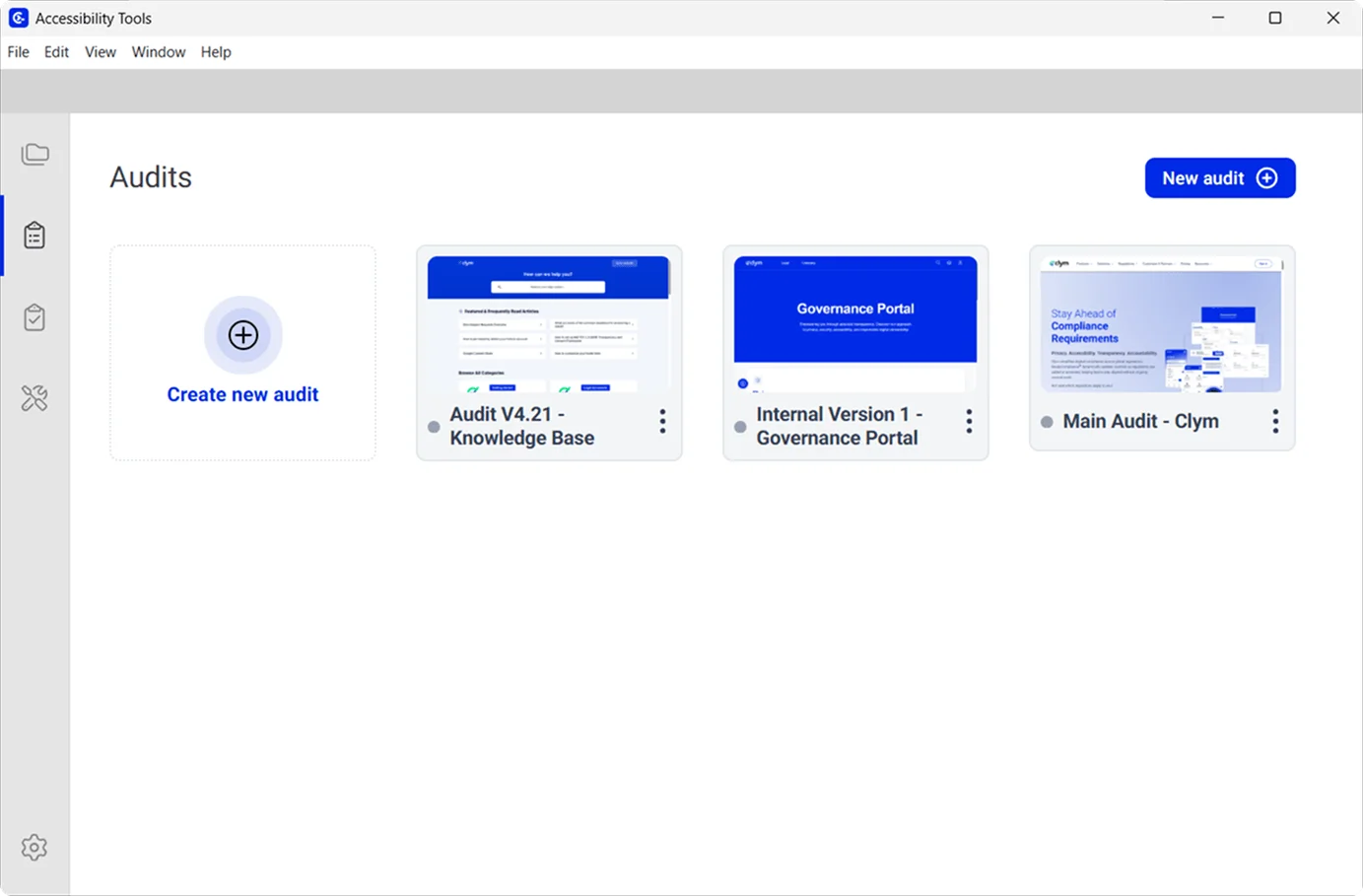
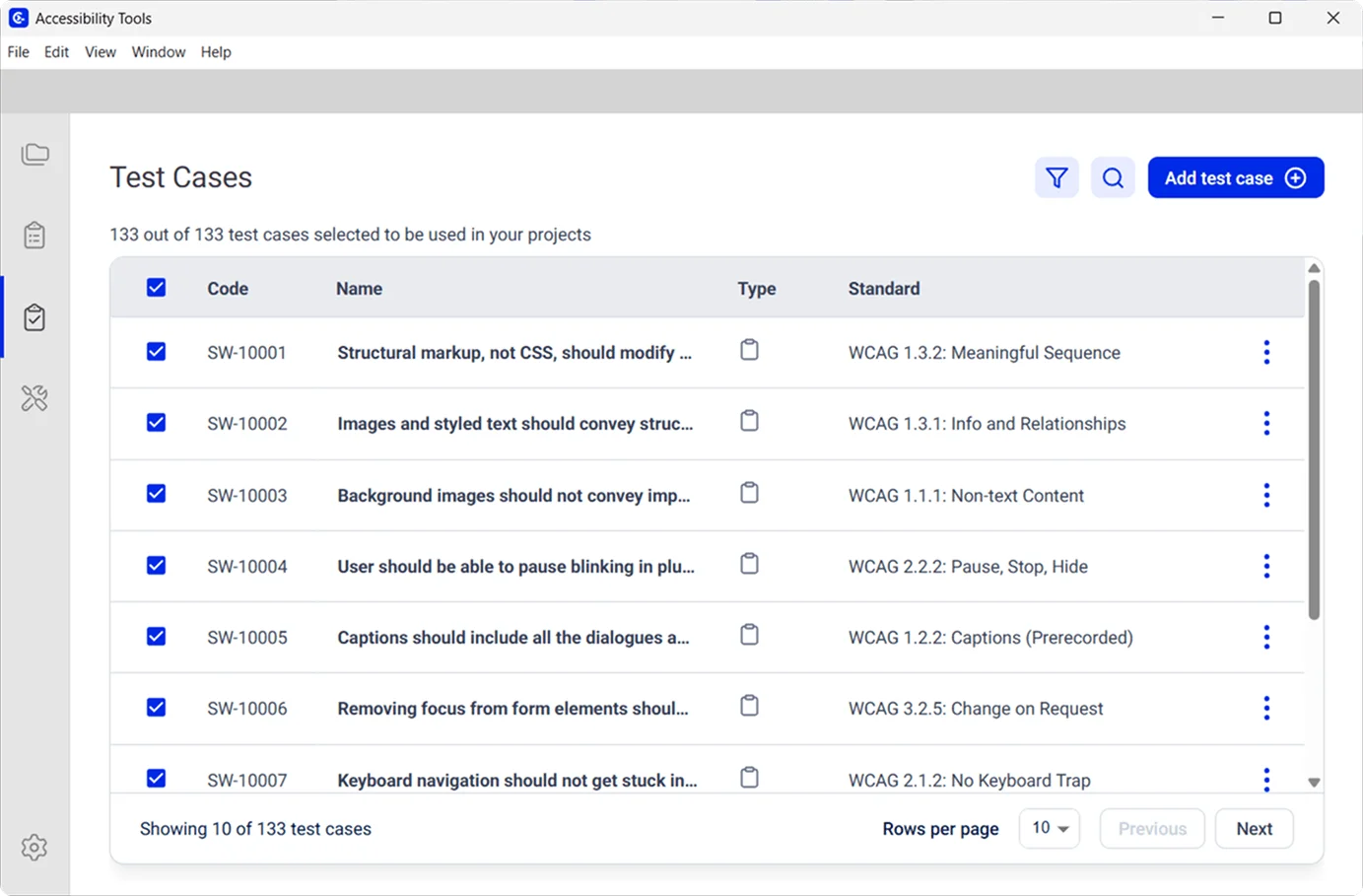
This is the stage where Clym Accessibility Tools provides the most value. It is a free, open-source desktop application that tests against WCAG 2.0, 2.1, and 2.2 at levels A, AA, and AAA. The tool utilizes 100 axe-core rules organized into our own custom categories.
These rules are executed through 36 automated tests and paired with 76 guided manual test procedures, helping you cover the full range of criteria required for a professional VPAT audit. The application is cross-platform, running on macOS, Windows, and Linux.
If you want a faster initial scan before committing to a full VPAT audit, Clym also offers a free Accessibility Scanner that detects WCAG 2.2, Section 508, and EN 301 549 issues in under a minute per page.
Step 3: Map your findings to VPAT criteria
Once you have the test results, map each finding to the relevant WCAG success criterion, Section 508 provision, or EN 301 549 requirement in your chosen template. Next, group issues by criterion. A single criterion may have multiple findings from different parts of your product. Keep your evidence notes alongside each mapping so you can reference them when writing remarks.
Step 4: Assign conformance levels
Work through the conformance table and assign the appropriate level to each criterion based on your audit findings. Be honest. Overstating conformance damages credibility and can expose you to legal risk if a buyer relies on inaccurate documentation. A VPAT that acknowledges partial support with clear explanations is more trusted than one that claims full support across the board.
Step 5: Write your remarks
For every criterion rated Partially Supports or Does Not Support, write specific, detailed remarks. Describe exactly what works, what does not, and where in the product the issue occurs. Include your remediation timeline where relevant. Remarks such as 'will be addressed in a future release' without specifics are not acceptable and will reduce the document's credibility with experienced procurement teams. Here is an example:
Avoid vague remarks such as: “Some accessibility issues exist and will be addressed in a future release.”
Instead, provide specific, actionable detail. For example: “On the ‘Checkout’ page, the ‘Place Order’ button is not reachable using keyboard navigation due to a missing focus state in the custom component. This prevents keyboard-only users from completing a purchase. A fix is in progress to restore proper focus handling and will be included in the September 2026 release.”
Step 6: Generate your VPAT report
At this point, you need to produce the completed VPAT document in the correct ITI format. You can fill the official template and manually input your audit notes, or use a tool that generates the output directly from the audit workflow.
Clym Accessibility Tools generates VPAT reports as a direct output, in all four editions: VPAT 2.5 508, EU, WCAG, and INT. Rather than copying findings into a separate template, you can export structured VPAT documentation from the same workflow you used for the audit. The reports follow the standard ITI format and are ready to share with procurement teams. Download it free from Clym Accessibility Tools.
Step 7: Have it reviewed by an accessibility professional
ITI and accessibility specialists strongly recommend that an experienced professional or third-party auditor review your completed VPAT before you publish it. Self-assessments are more likely to contain inaccuracies. An independent review significantly strengthens the document in competitive procurement situations where buyers scrutinize VPAT credibility.
Step 8: Publish your ACR
The completed document is your Accessibility Conformance Report. Make it publicly available on your website, ideally on your product or support pages. Include the product version the report covers, the evaluation date, and the VPAT edition used. Provide it promptly to any buyer who requests it during the sales process.
Common VPAT mistakes to avoid
Skipping manual testing. Automated tools alone cannot produce an accurate VPAT. A credible VPAT audit always includes manual testing alongside automated scanning.
Marking everything as “Supports”. Procurement officers review enough VPATs to recognize this immediately. An honest document with explained partial support is more credible.
Using an outdated template. VPAT 2.5 is the current version. Older templates may not align with the standards your buyer is evaluating against.
Vague or absent remarks. Remarks must describe what works, what does not, and where. Partial support without explanation is not useful to the buyer.
Not updating after product changes. A VPAT reflects a point-in-time evaluation. Any significant product update affecting accessibility should trigger a review and update of your ACR.
Conclusion
A VPAT is not optional for ICT vendors targeting government or enterprise buyers. Section 508, the European Accessibility Act, and enterprise procurement policies are all pointing in the same direction: show us your documentation, and make sure it is accurate.
The process takes real effort and requires a genuine VPAT audit, but it is manageable when you follow the right structure. Choose the correct edition, run a thorough evaluation covering both automated and manual testing, assign conformance levels honestly, and write remarks that actually tell buyers what they need to know.
The goal is not a perfect document. It is an accurate one.
Get started with Clym Accessibility Tools to run the accessibility audit that underpins your VPAT and generate your ACR in all four editions, free.
Once your VPAT is in place, pair it with an accessibility statement on your website to give buyers a complete picture of your accessibility programme.
Frequently asked questions
VPAT stands for Voluntary Product Accessibility Template. It is a standardized document published by the Information Technology Industry Council (ITI) that ICT vendors use to declare how their product meets accessibility standards such as WCAG, Section 508, and EN 301 549.
A VPAT is the blank template published by the ITI. An ACR (Accessibility Conformance Report) is the completed version filled out for a specific product. When procurement teams ask for your 'VPAT,' they typically mean your completed ACR.
This is not strictly required unless your buyer asks for it. But VPATs are increasingly expected by enterprise companies, educational institutions, and European public sector buyers. Having one prepared removes a recurring procurement blocker in B2B and B2G sales cycles.
For US federal procurement, use VPAT 2.5 508. For EU public sector sales, use VPAT 2.5 EU. For coverage across both regions, or a single document for multiple markets, use VPAT 2.5 INT. If no specific standard is named, VPAT 2.5 WCAG is the most broadly accepted international option.
Yes. VPATs can be self-completed. An independent review is strongly recommended because self-assessments are more likely to contain inaccuracies. An experienced accessibility testing and auditing professional reviewing your completed document adds a layer of reliability that matters in competitive procurement.

Compliance Content Manager | CIPP/E (IAPP) | CPACC (IAAP)
Alex is a Compliance Content Manager at Clym, where he researches and writes about everything related to data privacy and web accessibility compliance for businesses, helping them stay informed on their compliance needs and spreading awareness about making the web safer and more inclusive. When he's not writing about compliance, Alex has his nose in a book or is hiking in the great outdoors.