WordPress GDPR compliance beyond cookie banners
GDPR for WordPress requires more than a cookie banner. Proper consent management, DSR handling, framework integrations, and geolocation-based rules are all part of the picture.
GDPR for WordPress requires more than a cookie banner. Proper consent management, DSR handling, framework integrations, and geolocation-based rules are all part of the picture.
Between today and when the GDPR came into force, over €6.1 billion in fines have been issued, across more than 2,685 enforcement actions. In 2025 alone, regulators issued roughly €1.2 billion in penalties, according to the GDPR Enforcement Tracker. More than 60% of those cumulative fines have been issued since January 2023. Enforcement is not stabilising. It is accelerating.
Here is the reality for most WordPress website owners: only 15% of websites meet the minimum requirements for GDPR compliance, according to research across the top 10,000 EU-facing websites. The other 85% have a cookie banner. They assume that covers them. It does not.
GDPR Articles 6 and 7 require consent to be freely given, specific, informed, and unambiguous. Continued browsing, pre-ticked boxes, and silence do not qualify as consent.
Google Consent Mode v2 has been mandatory since March 2024 for EU/EEA/UK publishers using Google Ads, Google Analytics 4 (GA4), or the Google Marketing Platform (GMP). Without it, personalised ad campaigns stop working.
Microsoft Clarity enforced cookie consent requirements for visitors from the EEA, the UK, and Switzerland as of October 2025. Without a proper consent integration, session recordings and heatmaps become unavailable for those visitors.
A Consent Management Platform (CMP) manages the full consent lifecycle. A cookie banner plugin addresses only the visible layer.
The European Data Protection Board (EDPB) and national regulators, including France’s CNIL and the UK’s ICO, are increasing the frequency of enforcement. The ICO issued cookie compliance warnings to 134 UK websites in 2025 alone.
The General Data Protection Regulation (GDPR) is the EU’s data protection law governing how businesses collect and process the personal data of people in the European Union and European Economic Area (EEA). For WordPress website owners, Articles 6 and 7 create specific, non-optional obligations around consent.
GDPR Article 7 defines valid consent as freely given, specific, informed, and unambiguous. That means users must take a deliberate, active action to opt in. GDPR Article 6(1)(a) establishes consent as the lawful basis for most cookie-based data processing. The EU’s ePrivacy Directive adds the requirement that consent must be obtained before cookies are placed on a user’s device, unless those cookies are strictly necessary for the service to function.
Together, these frameworks create five obligations for your WordPress website:
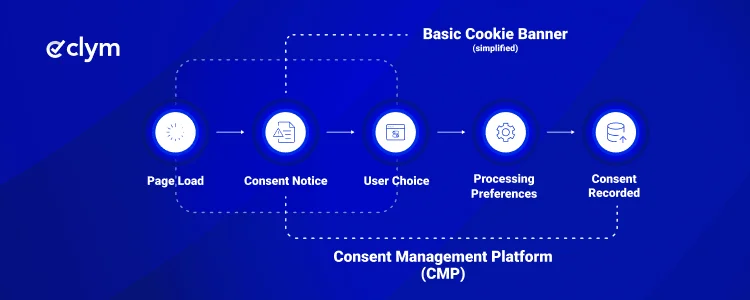
A cookie banner is the visible part of the consent process. But visible and functional are not the same thing. Here is where most WordPress setups fall short.
This is the most common and most serious GDPR failure on WordPress websites. Many plugins display a banner while tracking scripts have already loaded in the background. Google Analytics 4 (GA4), Meta Pixel, and similar tools begin collecting data from the moment the page renders. The banner is visible, but it is not blocking anything.
Under the ePrivacy Directive and the GDPR’s Article 7, no non-essential script should fire until the user has affirmatively consented. A banner that loads alongside the scripts is cosmetic, not compliant.
Showing a banner is not the same as having proof that a specific user consented on a specific date to specific categories. GDPR Article 7(1) places the burden of demonstrating consent on the data controller. If a regulator or an individual user requests evidence of consent, a GDPR plugin that does not log consent records leaves you without a defensible answer.
GDPR gives individuals the right to request access to their data, ask for deletion, or correct inaccuracies. A cookie banner plugin does not address this. Without a structured mechanism, those requests arrive in your inbox with no clear workflow for responding within the required 30 days.
If your WordPress website has visitors from the EU, UK, US, and Australia, different privacy laws apply to each. GDPR, UK GDPR, the CCPA/CPRA, and others have different consent standards. A single static banner served identically to every visitor does not meet each regime’s requirements.
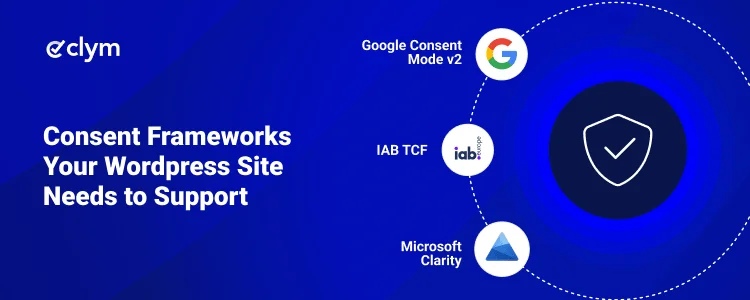
This is the section most cookie consent guides skip. And it is increasingly where real-world compliance failures happen. Your WordPress website almost certainly runs third-party tools that have their own consent requirements layered on top of GDPR. Getting your banner right is not enough if those tools are not receiving the consent signal correctly.
Consent frameworks your WordPress website may need to support
Framework | Who requires it | What it controls | Status |
|---|---|---|---|
Google (EU/EEA/UK websites) | Google Ads, GA4, GMP personalisation | Required since March 2024 | |
Microsoft (EEA/UK/Swiss websites) | Heatmaps, session recordings, funnel tracking | Enforced from October 2025 | |
Ad tech vendors and publishers | Programmatic advertising consent signals | All CMPs must support by Feb 2026 | |
UK GDPR / PECR / DUAA | ICO (UK-facing websites) | Cookies, electronic marketing | Ongoing enforcement |
If you search for a GDPR solution for your WordPress website, you will find two categories of tools: cookie banner plugins and Consent Management Platforms (CMPs). They are not the same thing, and choosing the wrong one for your needs creates real compliance gaps.
A WordPress cookie banner plugin does one thing: it adds a consent notice to your website. The best ones also block cookies before consent. But most stop there.
A Consent Management Platform (CMP) manages the full consent lifecycle. It captures consent, logs records, integrates with advertising and analytics platforms, handles data subject requests, and adapts to multiple privacy regulations automatically.
Feature | Cookie banner plugin | Consent management platform |
|---|---|---|
Cookie consent banner | Yes | Yes |
Script blocking before consent | Partial | Yes |
Granular consent by category | Sometimes | Yes |
Consent record keeping | Rarely | Yes |
Data subject request handling | No | Yes |
Google Consent Mode v2 integration | Rarely | Yes |
Microsoft Clarity integration | No | Yes |
IAB TCF v2.3 support | No | Yes |
Geolocation-based consent rules | Rarely | Yes |
Automatic legal update monitoring | No | Yes |
Multi-regulation support (GDPR, CCPA, LGPD) | No | Yes |
For simple WordPress websites with minimal third-party tracking, a well-configured cookie plugin may be sufficient. For any website running Google Ads, Google Analytics 4 (GA4), Microsoft Clarity, Meta Pixel, or targeting users across multiple jurisdictions, the gaps in a standalone plugin become material compliance risks.
The cost framing is also worth keeping in mind: potential GDPR fines of up to €20 million or 4% of global annual turnover for serious breaches mean the operational risk of non-compliant tracking is significantly greater than the cost of a properly configured consent management platform.
When evaluating tools, the distinction is not only in which features are listed. It is which features work in the way GDPR requires.
Must-have feature | Why it matters |
|---|---|
Script blocking before consent | Non-essential scripts must not run before opt-in. If GA4 or Clarity fires before consent, the banner is cosmetic. |
Granular consent by category | EDPB guidance requires separate opt-in for analytics, marketing, and functional cookies. |
Consent record logging | GDPR Article 7(1) requires you to be able to demonstrate consent. Records must include timestamp, notice version, and categories accepted. |
Google Consent Mode v2 integration | Required since March 2024 for EU/EEA/UK websites using Google Ads or GA4. |
Microsoft Clarity Consent API | Required since October 2025 for EEA/UK/Swiss websites using Clarity. |
Data subject request management | GDPR requires a structured process to receive and respond to DSRs within 30 days. |
Geolocation-based rules | Different regulations apply to different visitors. One banner for all jurisdictions creates gaps. |
IAB TCF v2.3 support | Required by February 2026 for websites running programmatic advertising. |
Automatic legal update monitoring | Privacy laws change. Manual monitoring is not sustainable for most teams. |
Multi-regulation support | GDPR covers EU visitors. CCPA/CPRA covers California. LGPD covers Brazil. Your solution should handle all three. |
The most common GDPR violation on WordPress websites is also the most invisible. Plugins like Google Analytics 4 (GA4), Meta Pixel, and Microsoft Clarity are frequently installed via the WordPress dashboard and begin running on page load, before any consent has been given. Your consent solution must actively block these scripts using a tag-blocking layer or Google Tag Manager (GTM) integration.
Pre-ticked boxes have been explicitly invalid under GDPR since 2018. The Court of Justice of the European Union confirmed this in the Planet49 ruling (Case C-673/17), which established that only “active behaviour on the part of the data subject with a view to giving his or her consent” satisfies the GDPR standard. GDPR Recital 32 specifically excludes silence, pre-ticked boxes, and inactivity from constituting valid consent.
Beyond pre-ticked boxes, consent designs that make accepting easy and declining difficult are increasingly present in regulators’ crosshairs. The CNIL fined Google €325 million in September 2025 partly because of consent interfaces that steered users toward accepting personalised advertising.
Your privacy policy explains what you do with personal data. It does not substitute for obtaining consent to do it. These are two separate obligations under GDPR. A link to your privacy policy in the banner footer is not a valid consent mechanism.
Different rules apply to different users. A visitor from California is covered by the CCPA/CPRA. A visitor from Brazil falls under the LGPD. A visitor from the EU falls under GDPR. Serving one uniform banner to every visitor regardless of location creates gaps in each jurisdiction’s requirements and unnecessarily reduces consent rates for users in regions with different standards.
Plugins get installed. Third-party scripts get added via Google Tag Manager (GTM). Your cookie footprint grows over time. If your consent notice lists 12 cookies and your website is now setting 24, your consent records are inaccurate. Regular cookie audits are a practical compliance requirement, not an optional extra.
Getting this right is more straightforward than it sounds. Here is a practical framework.
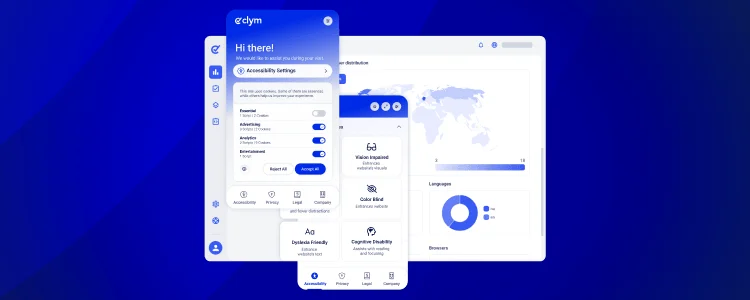
Clym is a Consent Management Platform (CMP) that works on WordPress through an embedded script rather than a traditional plugin. Because Clym runs outside the WordPress plugin ecosystem, there are no conflicts with your theme or other plugins, no dependency on WordPress core updates, and no gaps if you run pages built outside the standard WordPress template structure.
Here is what that looks like in practice.
If regulators or enterprise customers request proof of consent, your team has a complete audit trail immediately available: every consent event logged with a timestamp, the version of your notice shown, and the categories each user accepted or declined. You are not searching through server logs or piecing together evidence after the fact.
When Clym’s Google Consent Mode v2 integration is active, GA4 and Google Ads receive the correct consent signals based on each user’s choice. Personalised campaign data is not lost. Modelled conversions work as intended. Your reporting does not have unexplained gaps in EU traffic.
Clym communicates consent status to Microsoft Clarity in real time. Session recordings, heatmaps, and funnel data are collected only from users who have consented, keeping your analytics complete and your setup aligned with Clarity’s October 2025 enforcement requirements.
Clym detects where a visitor is coming from and serves the appropriate consent flow for their jurisdiction automatically. EU visitors get a GDPR-compliant experience. US visitors get one adapted to state privacy laws. This happens without manual configuration per region and without showing EU-style consent flows to visitors who do not require them.
When regulations change, such as a new EDPB guideline, a CNIL enforcement notice, or an ICO announcement, Clym updates automatically. Your consent setup stays current without your team having to track every regulatory development across multiple jurisdictions.
Users submit DSRs through a clear interface. Your team gets a structured workflow with the 30-day GDPR response window tracked. You are not managing these requests through a generic email inbox with no audit trail.
Clym supports IAB TCF v2.3, making it suitable for WordPress websites that run programmatic advertising and need to pass valid TC strings to their ad tech vendors ahead of the February 2026 deadline.
Most WordPress website owners sit somewhere between a basic cookie banner and a properly managed consent setup. The gap between those two positions is not just a legal risk. It is a business risk: non-compliant tracking affects the accuracy of your analytics, limits your advertising capabilities, and creates regulatory exposure as enforcement accelerates across the EU, UK, and beyond.
The cost of addressing this gap is predictable. The operational cost of not doing so is not. Potential GDPR fines reach €20 million or 4% of global annual turnover for serious breaches. And that is before the downstream effects on advertising performance and data quality that come from non-compliant consent signals.
Getting this right on WordPress does not require a technical team or a complete infrastructure rebuild. A properly configured Consent Management Platform handles script blocking, consent records, third-party integrations, DSR management, and regulatory monitoring automatically.
Start with the audit. Find out what your website is actually setting, whether those scripts are being blocked before consent, and whether your third-party tools are receiving valid consent signals. That single check will tell you more about your current position than anything else.
GDPR requires that non-essential cookies are blocked until a visitor actively consents. Under Article 7, consent must be freely given, specific, and unambiguous. You also need granular options by category, a mechanism to withdraw consent, auditable consent records, and a structured process for data subject requests. GDPR Articles 6 and 7 and the EU ePrivacy Directive govern these requirements together.
No. A cookie banner addresses only the visible layer of consent. To work toward GDPR compliance, your website must also block scripts before consent is given, log consent records, handle data subject requests within 30 days, and integrate consent signals with third-party tools like Google Analytics 4 and Microsoft Clarity. A consent management platform covers all of these. A basic plugin typically does not.
A cookie banner plugin adds a visible consent notice to your website. A Consent Management Platform (CMP) manages the full consent lifecycle: blocking scripts, logging records, passing signals to Google Consent Mode v2 and Microsoft Clarity, handling data subject requests, and adapting to multiple privacy regulations. For complex websites with advertising or analytics tools, the gaps a plugin leaves become material risks.
Yes. GDPR applies based on where your visitors are located, not where your business is registered. If people in the EU visit your WordPress website and you collect their personal data through cookies, analytics, or contact forms, GDPR obligations apply regardless of your company’s location.
Google Consent Mode v2 is a framework that controls how Google’s tools behave based on a user’s consent choices. Since March 2024, it has been required for EU, EEA, and UK publishers using Google Ads, Google Analytics 4 (GA4), or the Google Marketing Platform (GMP). Without it, personalised ad campaigns stop working and analytics data from EU visitors is significantly limited.
GDPR gives individuals the right to access their personal data, ask for corrections, or request deletion. Your website needs a clear mechanism for receiving these requests and a workflow for responding within 30 days. A structured DSR portal tracks submissions and response deadlines automatically. A standard contact form is technically sufficient for receiving requests but provides no workflow management or audit trail.
Yes. Clym runs as an embedded script rather than a WordPress plugin. You add the script to your website’s header directly or through Google Tag Manager (GTM). It runs independently of your WordPress installation: no plugin conflicts, no WordPress update dependencies, and coverage across your entire website, including custom-built pages outside the standard WordPress template.
WordPress GDPR compliance means configuring your WordPress website so that it meets the data protection obligations of the General Data Protection Regulation for any visitors from the EU or EEA. This includes blocking non-essential cookies before consent, providing granular consent options, logging consent records, supporting withdrawal of consent, and handling data subject requests within 30 days.

Adam is the Head of Digital Marketing at Clym, where he leverages his diverse expertise in marketing to support businesses with their compliance needs and drive awareness about data privacy and web accessibility. As one of the company’s original team members, Adam has been instrumental in shaping its journey from the very beginning. When he’s not diving into marketing strategies, Adam can be found cheering on his favorite sports teams or enjoying fishing.