
How to configure GA4 for privacy requirements
How to configure GA4 to support GDPR and CCPA requirements, keep ad data flowing with Consent Mode V2, and work toward meeting privacy obligations.
How to configure GA4 to support GDPR and CCPA requirements, keep ad data flowing with Consent Mode V2, and work toward meeting privacy obligations.
You have a working analytics setup. GA4 is running, your campaigns are pulling in data, and your reporting gives you what you need to make decisions. The last thing you want is a data protection authority telling you to stop or Google restricting your ad measurement because a required configuration is missing.
Here is the thing a lot of guides do not tell you upfront: you do not have to choose between useful analytics and respecting your users' privacy. With the right setup, you can keep GA4 running, protect your Google Ads performance, and work toward supporting your GDPR and CCPA obligations.
This guide shows you exactly what to configure, why each step matters for your business, and what you actually get from doing it.
GA4 is not automatically configured to meet GDPR requirements when you add it to your website. Google has made real privacy improvements in GA4, including not logging IP addresses for EU-based users by default. But the responsibility for how data is collected sits with you as the website owner, not with Google.
This matters because more than a dozen European data protection authorities, including those in Austria, France, Italy, Sweden, and Denmark, have issued rulings or guidance stating that standard use of Google Analytics transfers personal data to the US in ways that do not meet GDPR requirements. These are not theoretical concerns. Companies have received formal orders to stop using GA, and Sweden's IMY issued fines in 2023.
The gap between default GA4 and GDPR-aligned GA4 is smaller than most people think. You do not need to rebuild your analytics stack or switch tools. You need to make six targeted configuration changes, and this guide walks you through each one.
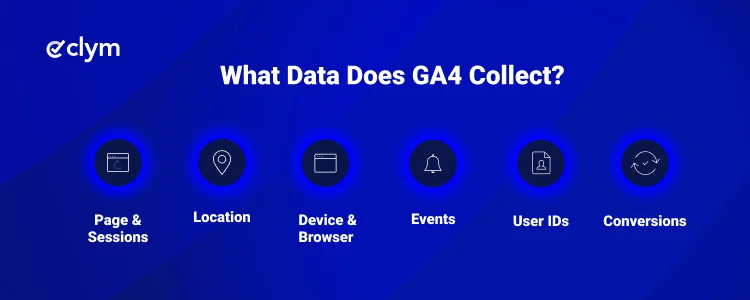
Understanding what GA4 collects helps you understand what needs to be covered by consent and disclosed in your privacy policy. GA4 collects:
Under GDPR, identifiers tied to individual users, such as the client ID stored in the _ga cookie, are considered personal data. This is why consent is required before GA4 can track EU visitors, and why simply installing GA4 without a consent layer puts you at risk.
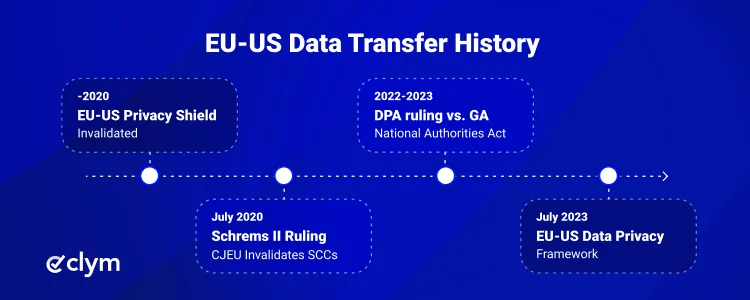
Google Analytics sends data to Google's US-based servers. The Schrems II ruling in July 2020 removed the main legal framework that covered these transfers, and national regulators across Europe started issuing enforcement decisions against companies using GA.
Country and date | Authority | Action taken |
|---|---|---|
Austria, January 2022 | DSB ruling | Declared standard GA use in violation of GDPR due to inadequate transfer safeguards. |
France, February 2022 | CNIL ruling | Found GA non-compliant. Gave businesses one month to act. |
Italy, June 2022 | Garante ruling | Ruled that GA transfers personal data to the US without adequate protection. |
Sweden, June 2023 | IMY enforcement | Fined four companies. Specifically cited Google Signals as an additional risk. |
Denmark / Norway / Netherlands | Guidance issued | Advised businesses to stop using GA or implement additional safeguards. |
The EU-US Data Privacy Framework, adopted in July 2023, restored a legal basis for EU-US data transfers with certified US companies, including Google. This improved the situation considerably. However, the framework faces ongoing legal challenges, so relying on it as your only safeguard carries risk. The most resilient approach combines it with proper consent collection and Google Consent Mode V2.
These steps apply to most businesses using GA4 in or serving users in Europe and California. Your specific situation may require additional steps, and it is worth getting input from your legal or data protection team on what applies to you.
When GA4 fires only after a valid consent choice, your analytics data is easier to explain, document, and review. It also helps reduce the risk of collecting data before users have made a consent decision, one of the most common areas privacy teams need to address.
GDPR requires informed, freely given consent before non-essential tracking technologies activate. GA4 uses cookies and identifiers that fall into this category for EU and EEA visitors. Without a consent layer, GA4 runs the moment your page loads, collecting data on every visitor regardless of whether they agreed.
A consent management platform (CMP) blocks GA4 from firing until a user accepts analytics cookies. When integrated with your tag manager, the CMP handles the consent signal automatically. Users who decline are not tracked. Users who accept are tracked. And every consent action is recorded.
Clym detects third-party services on your site through RealtimeCompliance™ and can configure consent experiences based on visitor location. This may include opt-in consent experiences for EU visitors, opt-out experiences for California users, and other jurisdiction-specific configurations, without requiring custom development.
Consent Mode V2 helps Google Ads continue measuring campaign activity when users decline cookies. It sends consent signals to Google and can support conversion modeling, giving your team more usable reporting without relying only on cookie-based tracking.
Google Consent Mode V2 became a requirement for businesses using Google Ads or GA4 in the EU, EEA, and Switzerland from March 2024. If you run paid search, display, or shopping campaigns in Europe, this is the configuration that protects the accuracy of your conversion reporting and audience data.
It works by passing consent signals from your CMP to Google's tags in real-time. When a user declines, GA4 does not track them individually. Instead, Google applies modeled data to estimate behavior patterns across opted-out users, maintaining your measurement coverage.
There are two modes:
Basic mode: GA4 and Google Ads tags only fire after the user grants consent. Cleaner from a tracking perspective, but you lose measurement entirely for users who decline.
Advanced mode: Tags load on all users, but only track individuals when consent is granted. For users who decline, Google applies behavioral modeling. This gives you broader measurement coverage while respecting privacy.
Clym’s Google Consent Mode V2 integration supports the transmission of consent signals to Google services, including ad_user_data, ad_personalization, analytics_storage, and ad_storage. Configuration can be managed through the platform without requiring custom development for most implementations.
A Data Processing Agreement helps document the legal basis for using GA4 when Google processes personal data on your behalf. Under GDPR Article 28, controller-processor relationships need to be formalised, and having this agreement in place gives your team a clearer record of how that vendor relationship is managed.
Google provides a standard DPA as part of its Terms of Service. You accept it through the GA4 interface, and it covers the required elements: confidentiality, security measures, data subject rights, and processing responsibilities.
To accept Google's DPA:
Sign in to your Google Analytics 4 account.
Go to Admin, then Account Settings.
Scroll to Data Processing Amendment.
Click to review and accept the amendment.
This is a one-time admin step that takes under five minutes. It is often overlooked, but it is one of the first things a data protection authority will check.
Setting a clear retention window helps keep GA4 reports focused on more current data and supports the principle that personal data should not be stored longer than needed. It can also make data subject access or deletion requests easier to review because your team has less historical data to assess.
GA4's default data retention period is two months for user and event-level data. You can extend this to 14 months through the settings. The right period depends on your reporting needs, but setting it deliberately is better than leaving it on default.
To update retention settings:
In GA4, go to Admin, then Data Settings, then Data Retention.
Set user-level data retention to match your actual reporting requirements.
Consider enabling 'Reset user data on new activity' if you want retention to refresh when users engage again.
Turning off Google Signals can help reduce a risk area that has appeared in EU enforcement decisions, while still allowing GA4 to collect standard analytics data. Your team can continue using core reporting and event tracking without relying on Google Signals for advertising features.
Google Signals links GA4 data to users' Google accounts, enabling cross-device tracking and audience sharing across Google's advertising ecosystem. Sweden's IMY specifically identified Signals as a contributing factor in its 2023 enforcement actions, because it enables data flows that go beyond what most users expect from standard web analytics.
For businesses that cannot confirm all EU visitors have explicitly consented to this type of cross-device tracking, disabling Signals reduces that exposure.
To disable Google Signals:
In GA4, go to Admin, then Data Collection.
Deactivate Google Signals data collection.
A clear privacy policy helps users understand what data you collect, why you collect it, and how analytics tools like GA4 fit into your privacy practices. It also supports GDPR’s transparency requirements and gives your team a stronger reference point if questions or complaints arise.
Your privacy policy should disclose that you use Google Analytics, what data is collected, how long it is retained, and whether it is transferred outside the EU (and under what legal basis). Your cookie policy should list GA4 cookies by name, category, and duration.
These are not optional extras. They are expected by regulators and, more importantly, by users. Clym's policy management solution helps you create and maintain GDPR and CCPA-aligned privacy and cookie policies that update automatically as your cookie inventory changes.
In Universal Analytics, you had to manually enable IP anonymization by adding a code snippet. In GA4, Google states that IP addresses from EU-based users are not logged or stored by default. That is a genuine improvement.
It does not, however, replace the need for consent or any of the steps above. European regulators found that anonymizing IP addresses was not a sufficient safeguard when other identifiers, such as client IDs, device fingerprints, and User IDs, were still being transferred to US servers. The enforcement actions against GA focused on the data transfer problem as a whole, not IP logging specifically.
GA4's default IP handling is a step in the right direction. It is not a shortcut past the rest of your setup.
The California Consumer Privacy Act (CCPA) and its successor, the CPRA, work differently from GDPR. Where GDPR requires opt-in consent before tracking, CCPA operates on an opt-out model: analytics can generally run, but you must give California users a clear way to say no.
For businesses using GA4 under CCPA, the key actions are:
A consent management platform can detect California-based visitors and apply the right opt-out workflows automatically, including reading Global Privacy Control (GPC) signals from browsers where users have enabled them.
Requirement | GDPR (EU / EEA) | CCPA / CPRA (California) |
|---|---|---|
Consent model | Opt-in required before GA4 fires | Opt-out model; GA4 can run until user opts out |
Cookie banner needed | Yes, before non-essential cookies load | Not required for analytics alone, but recommended |
Privacy policy disclosure | Required, with specific disclosures | Required |
DPA with Google | Required under GDPR Article 28 | Not explicitly required under CCPA |
Data deletion rights | Right to erasure under Article 17 | Right to deletion for qualifying businesses |
Google Consent Mode V2 | Required for EU Google Ads users | Not legally required, but good practice |
Key enforcement risk | Activating tracking before consent | Missing opt-out mechanism or DNSMPI link |
GA4 can be a powerful analytics tool and a privacy-respecting one at the same time. The two are not in conflict. What matters is that the setup is deliberate rather than default.
When you get consent before tracking fires, your data is cleaner and more defensible. When you implement Consent Mode V2, your Google Ads measurement stays intact even for users who opt out. When you sign the DPA and update your policies, you have a documented record showing you have taken the steps that regulators expect.
None of these steps require rebuilding your analytics from scratch. They are configurations, most of which take under an hour to put in place. And if you want to handle the consent layer, Consent Mode integration, and policy management in one go without writing custom code, that is exactly what Clym is built to do.
No. GA4 includes privacy improvements such as not logging IP addresses for EU users by default, but website owners are responsible for consent collection, Google Consent Mode v2, the Data Processing Agreement with Google, data retention settings, and privacy policy disclosures. GDPR alignment requires active configuration, not just installation.
Yes, if you serve users in the EU or EEA. GDPR requires freely given, informed consent before non-essential cookies activate. GA4 uses cookies to track users, which means your consent banner must block GA4 from loading until consent is granted. A consent management platform handles this automatically.
Google Analytics has not been formally banned across Europe, but multiple national data protection authorities have issued decisions finding that standard GA use does not meet GDPR requirements. Since the EU-US Data Privacy Framework was adopted in 2023, the legal basis for EU-US data transfers has improved, but proper consent configuration and Consent Mode setup are still expected.
Google Consent Mode V2 passes consent signals from your consent banner to Google's tags, adjusting how GA4 and Google Ads behave based on what users accept or decline. It has been required for businesses running Google Ads in the EU, EEA, and Switzerland since March 2024. Without it, Google restricts conversion modeling and audience data for those regions.
GA4 can be configured to reduce cookie use through server-side tracking or by limiting certain signals. However, standard GA4 still sets a first-party cookie (typically _ga) to distinguish between visitors. For fully cookie-free analytics in the EU, purpose-built privacy-first tools may be more suitable.

Adam is the Head of Digital Marketing at Clym, where he leverages his diverse expertise in marketing to support businesses with their compliance needs and drive awareness about data privacy and web accessibility. As one of the company’s original team members, Adam has been instrumental in shaping its journey from the very beginning. When he’s not diving into marketing strategies, Adam can be found cheering on his favorite sports teams or enjoying fishing.