Accessible content checklist
Nine steps marketers can use to create accessible content: headings, alt text, link text, plain language, captions, accessible PDFs, clear forms, and testing.
Nine steps marketers can use to create accessible content: headings, alt text, link text, plain language, captions, accessible PDFs, clear forms, and testing.
Accessible websites rely on behind-the-scenes elements aligned with WCAG guidelines. As marketers add content, they should follow accessibility guidelines to reduce the risk of introducing new barriers. They should pay careful attention to their additions, including blog posts, headlines, videos, images, lead magnets, and interactive forms. Designers and developers build that foundation (see our guides for designers and developers), while marketers shape the content visitors read and interact with.”
The following accessibility checklist helps marketers evaluate whether new website content aligns with accessibility guidelines.
Step | Action | What to do |
|---|---|---|
1 | Audit existing content | Inventory webpages, blogs, PDFs, videos, forms, and downloadable resources. Prioritize high-traffic and conversion pages. |
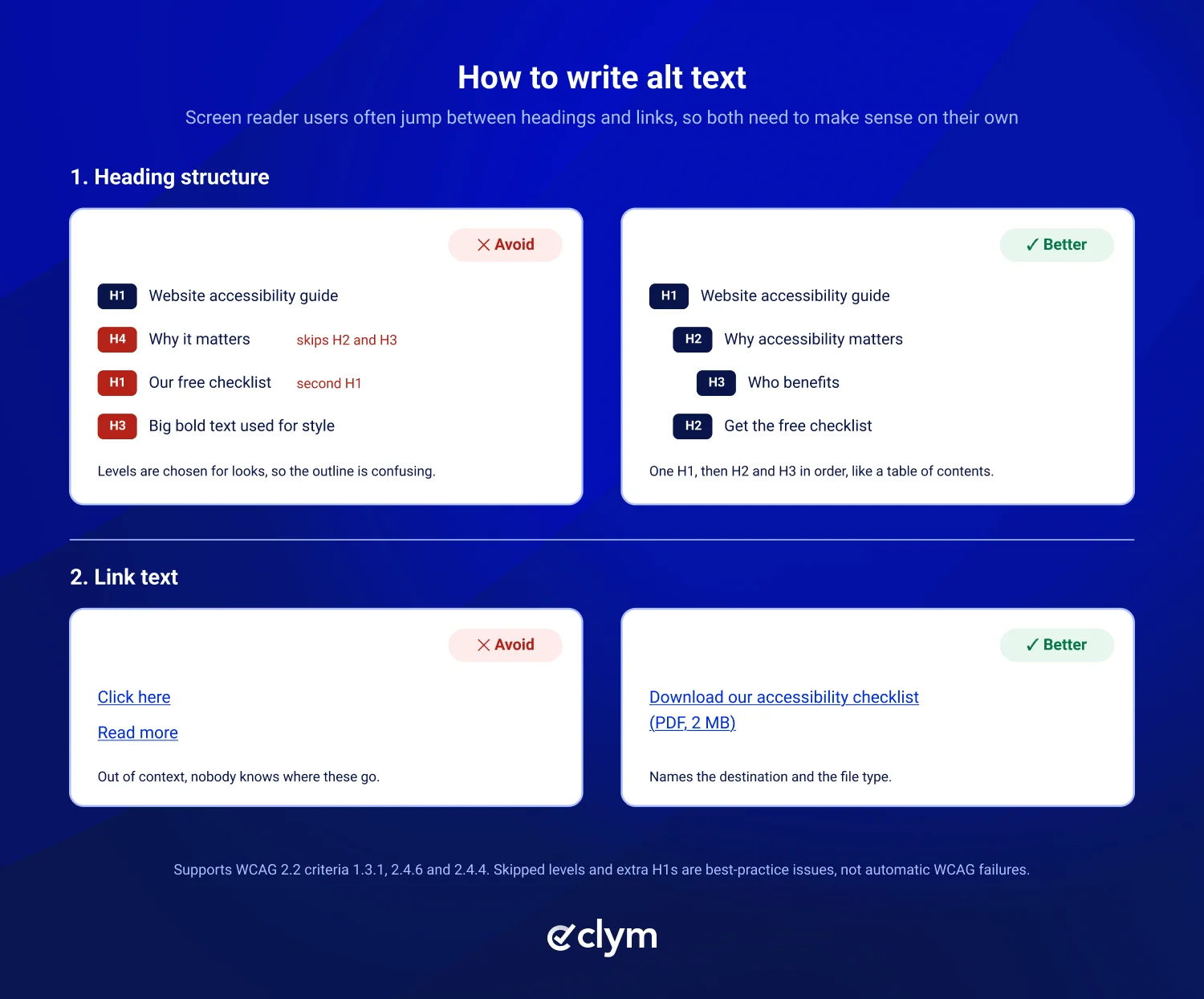
2 | Structure headings | Use one descriptive H1 for the page's main topic, followed by logical H2s and H3s. |
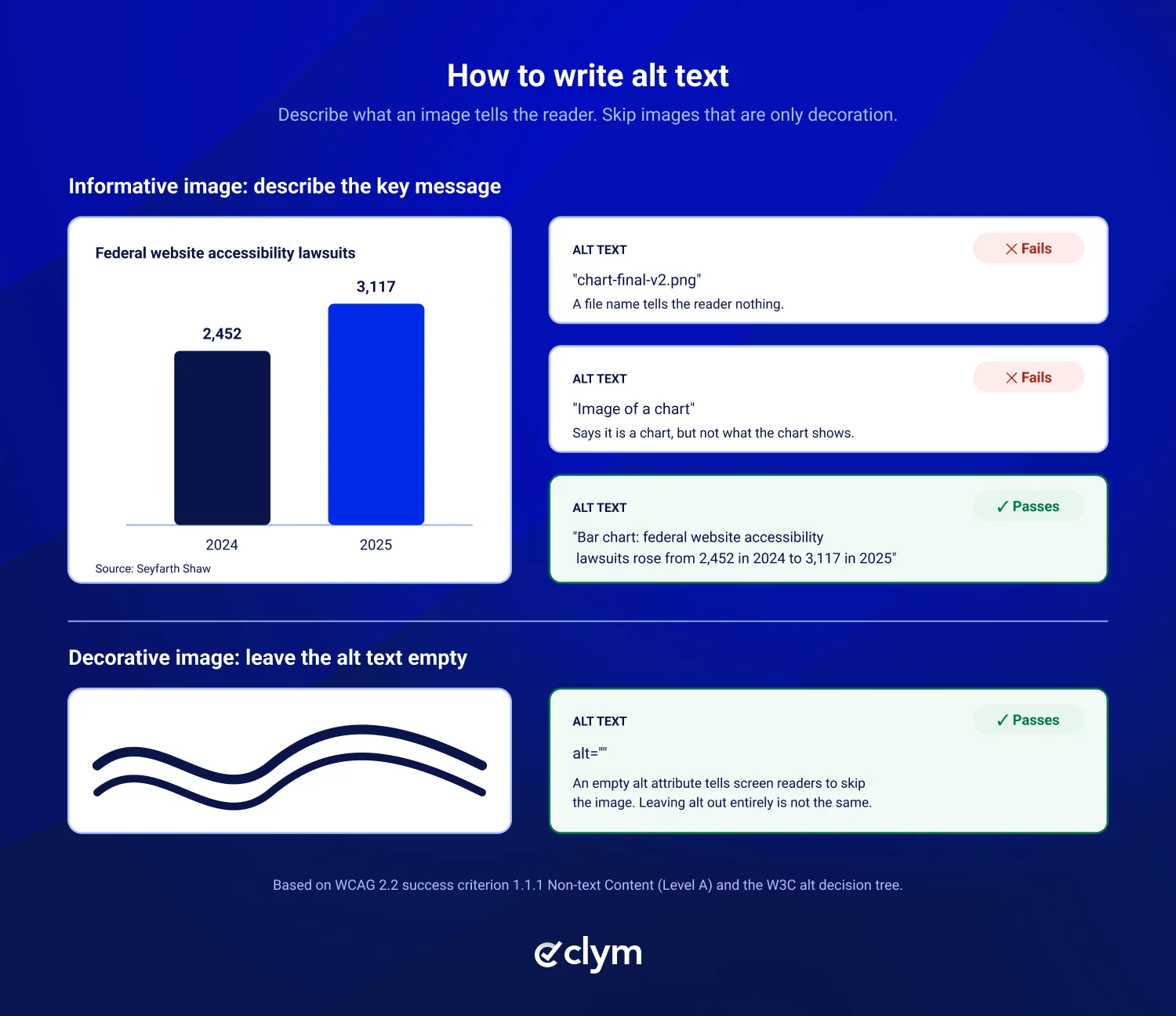
3 | Write accessible image descriptions | Add meaningful alt text for informative images. |
4 | Improve link text | Replace vague links like "click here" with descriptive text such as "Download our accessibility checklist." |
5 | Review readability | Use clear language, short paragraphs, meaningful subheadings, and explanations of technical terminology to improve web accessibility. |
6 | Make multimedia accessible | Provide accurate captions for prerecorded videos, transcripts for audio-only content, and audio descriptions where necessary to assist with accessibility for cognitive disabilities. |
7 | Check downloadable resources | Verify that PDFs, presentations, and other downloadable documents are properly structured and accessible. |
8 | Review forms and CTAs | Review instructions, required fields, and error messages for clarity. |
9 | Test and maintain content | Use accessibility checkers, manual content reviews, and an accessibility checklist before publishing. |
When marketers modify or add content to websites, their updates should align with WCAG accessibility guidelines, because content is a key part of an ADA accessible website. Blog posts, headings, image descriptions, and multimedia assets are just a few elements to consider. To find common accessibility issues across your website, start with Clym's free Scanner, then review content manually using the checklist above. Simply enter your website address and some basic information, and receive a more complete picture of what needs to be done.
If you need further or more personalized support, our team is happy to help.
Good alt text describes the information or purpose of an image in the context of the page. Keep descriptions concise and focus on what matters to the reader. For charts and complex graphics, provide the key information elsewhere on the page when needed. Decorative images should use an empty alt attribute (alt=””), while images used as links or buttons should describe their function.
Captions are synchronized text of the dialogue and important sounds in a video. Transcripts are a text version of audio-only content, such as a podcast. Audio descriptions narrate important visual information that the soundtrack does not explain. Under WCAG 2.2, captions for prerecorded video (1.2.2) and transcripts for audio-only content (1.2.1) are Level A, while audio description for prerecorded video (1.2.5) and captions for live video (1.2.4) are Level AA.
Usually not on their own. Automatically generated captions often get names, technical terms, and punctuation wrong, and the W3C notes that automatic captions are generally not sufficient unless they are confirmed to be fully accurate. Use them as a first draft, then review and edit them before publishing.
Yes, accessibility should extend to downloadable resources, including PDFs, Word documents, and presentations. These files can create barriers when headings, reading order, images, or tables aren’t properly structured. Legal requirements vary by organization, but following accessibility guidelines when creating downloadable content helps make information available to more people.
WCAG 2.2 Level AA does not set a reading level. The Level AAA criterion 3.1.5 Reading Level asks for content that does not require more than a lower secondary education reading ability, or a simpler supplement. In practice, short sentences, plain language, descriptive subheadings, and explained terms help everyone, especially people with cognitive disabilities.

Compliance Officer
Compliance Officer | CIPP/E (IAPP) | CPACC (IAAP)
Alex is a Compliance Officer and Content Developer at Clym, where he researches and writes about everything related to data privacy and web accessibility compliance for businesses, helping them stay informed on their compliance needs and spreading awareness about making the web safer and more inclusive. When he's not writing about compliance, Alex has his nose in a book or is hiking in the great outdoors.