This article explains how to configure Google Analytics under CCPA in 2026, including CCPA opt-out handling, Global Privacy Control (GPC), Google Consent Mode V2, data retention, and tracking disclosures.
How to Configure Google Analytics for CCPA in 2026
Many businesses rely on Google Analytics to measure website traffic and user behavior, but its configuration must be evaluated under the California Consumer Privacy Act (CCPA). In 2026, regulators focus on how tracking tools operate in practice, including script blocking, CCPA opt-out handling, Global Privacy Control (GPC), Google Consent Mode configuration, and data retention.
This guide explains how to manage Google Analytics under CCPA using structured configuration controls, script management, and documented privacy workflows.
This topic is part of a broader overview of California Consumer Privacy Act requirements, which are covered in more detail in our CCPA compliance guide for businesses.
Why Google Analytics requires careful handling under CCPA
Google Analytics is designed to measure website usage, but analytics data often includes online identifiers and behavioral signals that can be associated with individual consumers or households. As a result, analytics data frequently falls within the scope of CCPA’s broad definition of personal information.
Analytics configuration decisions affect:
- What data is collected
- When data collection begins
- How long data is retained
- How consumer preferences are respected
In 2026, regulators are less focused on labels like “analytics” and more focused on whether tracking behavior aligns with disclosures, opt-out handling, and internal documentation.
Why Google Analytics configuration matters under CCPA in 2026
Earlier CCPA guidance emphasized the importance of disclosures and links. Enforcement has since shifted toward operational behavior, including:
- When analytics scripts load
- How opt-out and Global Privacy Control signals are applied
- Whether retention periods reflect business needs
- Whether decisions are documented and reviewed
Poorly coordinated or undocumented analytics setups can create risk, even when intentions are good.
Whether these requirements apply depends on factors such as business thresholds and data practices, which are outlined in our CCPA applicability guide.
What data Google Analytics collects and how CCPA treats it
Google Analytics collects and processes data such as:
- Cookie identifiers (client IDs)
- Device identifiers and browser details
- Operating system information
- IP address (used for approximate location)
- Page views, clicks, scroll events, and session activity
- Timestamps and interaction events
These data points allow Google Analytics to track user behavior across sessions and devices.
Under CCPA, online identifiers and internet activity information are included in the definition of personal information when they can be linked to a consumer or household.
Even when used strictly for website measurement, analytics data may fall within CCPA disclosure requirements, opt-out handling, and consumer rights obligations.
Is Google Analytics considered selling or sharing personal information?
Google Analytics is not automatically classified as selling or sharing under CCPA. Classification depends on:
- Data sharing settings
- Advertising integrations
- Cross-context behavioral advertising use
- Contract structure
If analytics data supports advertising or cross-platform profiling, selling or sharing analysis may apply. See our guide to selling and sharing under CCPA for a deeper breakdown.
Consent signals, opt-outs, and Google Analytics behavior
Google Analytics is one of several tracking technologies affected by these rules, which are explained more broadly in our guide to CCPA and online tracking.
CCPA is often described as an opt-out–based regulation, but how Google Analytics operates depends on how analytics data is used and whether certain conditions apply, such as selling or sharing analysis or recognized preference signals.
In some scenarios, analytics behavior is expected to adjust before or at the point of data collection rather than only after a user takes action. This is especially relevant when signals like Global Privacy Control are present.
For Google Analytics, this creates practical questions about when analytics scripts should run and how data collection should respond once those conditions are met.
How does opt-out under CCPA affect Google Analytics?
When a consumer opts out of selling or sharing, businesses typically assess how analytics should behave going forward. Depending on classification and configuration, this may involve:
- Suppressing analytics execution
- Limiting certain analytics features
- Continuing analytics in a modified form
- Documenting why analytics remains active
Consistency is key. Analytics behavior should align with disclosures and how similar signals are handled across other tracking technologies.
Step-by-step: Configuring Google Analytics using a CCPA-oriented approach
Configuring Google Analytics under CCPA is less about a single setting and more about applying consistent operational controls. The steps below outline a structured approach many organizations follow in California-related contexts.
Step 1: Determine how Google Analytics data is used under CCPA
Before adjusting settings, teams often document:
- What categories of data analytics may process
- Whether analytics is used strictly for internal measurement
- Whether analytics interacts with advertising or cross-platform tools
This classification informs disclosure language, opt-out handling, and configuration choices.
Step 2: Control when Google Analytics scripts load
A common CCPA issue occurs when Google Analytics loads immediately on page visit, before opt-out or Global Privacy Control (GPC) signals are evaluated.
Under CCPA, Google Analytics may run by default, but its behavior must adjust when a valid opt-out, Global Privacy Control (GPC) signal, or selling or sharing condition applies, such as:
- CCPA opt-out status
- Global Privacy Control signals
- Regional logic
There are two primary technical approaches:
Script blocking
Google Analytics is prevented from loading when an opt-out or GPC signal applies. No analytics code executes and no data is sent.
Google Consent Mode V2
Google Analytics loads, but consent signals such as analytics_storage control how it behaves. When denied, cookies and identifiers are restricted, although limited cookieless pings may still be sent.
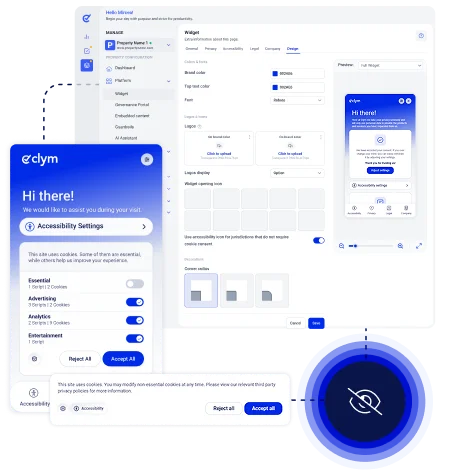
Clym manages both approaches. It can block Google Analytics entirely or update Google Consent Mode V2 signals automatically based on user preferences and GPC detection. Controls can be applied specifically to Google Analytics or at the broader Analytics category level.
This keeps CCPA opt-out handling consistent across tracking technologies.
Step 3: Align Google Analytics with opt-out and Global Privacy Control signals
Opt-out signals under CCPA, including Global Privacy Control, must affect how Google Analytics operates.
Organizations typically define whether opt-out results in:
- Full script blocking
- Restricted execution through Google Consent Mode
- Category-level suppression of analytics tools
Clym detects Global Privacy Control signals automatically and applies predefined analytics rules at either:
- The individual Google Analytics script level
- The broader Analytics category level
This aligns with established practices for handling opt-out requests under the CCPA, particularly when analytics data is involved.
Step 4: Configure Google Analytics data retention for CCPA
Google Analytics data retention settings and integrations influence how long analytics data remains accessible and how it may be used over time. Retention decisions affect long-term exposure and should reflect current business needs rather than default configurations.
Marketing teams often review:
- Whether analytics data is retained longer than necessary
- Which integrations or linked services have access to analytics data
- Whether retention and integration choices still align with current use cases
These decisions are commonly revisited as marketing strategies, tools, or regulatory expectations evolve.
Data retention affects long-term exposure. Default GA4 settings may not reflect actual business needs.
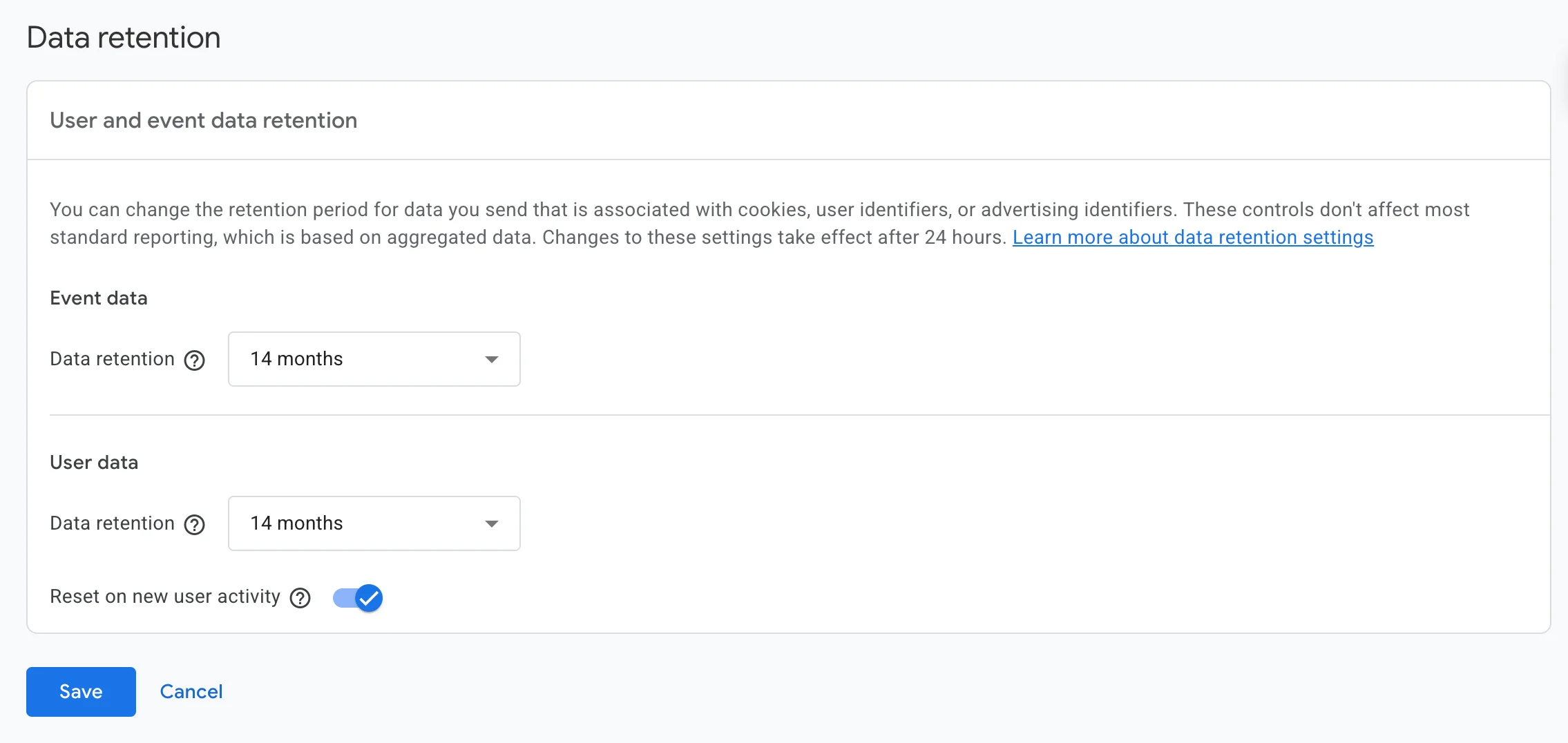
To review retention in GA4:
- Open Google Analytics and select your GA4 property
- Go to Admin (gear icon in the bottom-left)
- Under Property settings, select Data settings
- Click Data retention
- Choose how long event data and user-level data are retained
- Save your changes
Google Analytics allows retention periods to be adjusted, but changes apply going forward and do not retroactively delete previously collected data.
Retention periods should be reviewed in light of broader CCPA data retention rules, rather than relying on default analytics settings.
Step 5: Align Google Analytics configuration with CCPA disclosures
Changes to how Google Analytics operates should be reflected across public disclosures and internal records. When analytics behavior changes but notices or policies do not, misalignment can occur over time.
Teams typically keep analytics changes aligned with:
- Notices at collection
- Privacy and cookie notices
- Internal documentation used by privacy, legal, and marketing teams
Clym centralizes privacy and cookie policy management in one place, allowing teams to update disclosures as analytics configurations change. Policies can be managed, versioned, and published consistently across the website, reducing the risk of outdated or conflicting information.
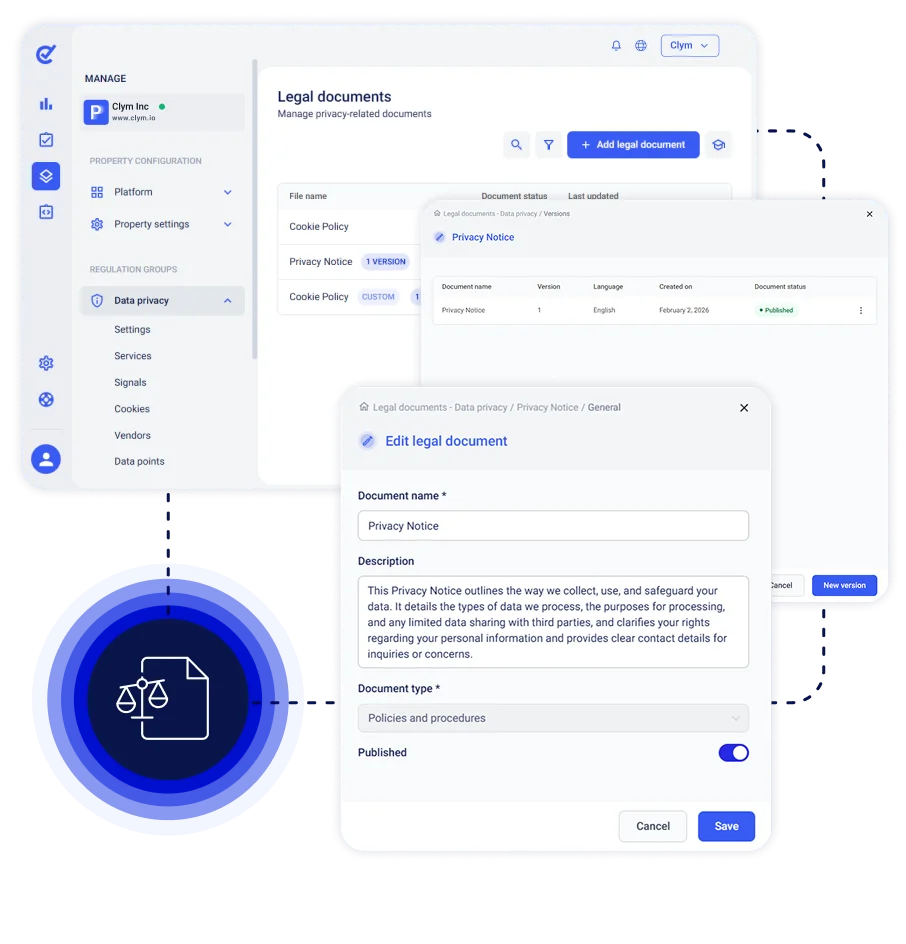
This makes it easier to reflect how Google Analytics actually behaves in practice, especially when analytics execution, opt-out handling, or GPC logic is updated.
Analytics behavior should be reflected in user-facing disclosures, including the CCPA notice requirements that apply to websites and tracking technologies.
Notice and Disclosure Considerations for Google Analytics
Transparency under CCPA is evaluated based on how accurately disclosures reflect real tracking behavior.
When Google Analytics is used, teams typically review whether their notices:
- Explain that analytics-related identifiers and usage data may be collected
- Describe the general purpose of analytics data collection
- Explain how users can exercise opt-out rights or express preferences
Privacy notices often address:
- Categories of analytics data collected
- High-level purposes
- Interactions with other services
- General retention considerations
Clym centralizes privacy and cookie policy management, making it easier to keep disclosures aligned as analytics configurations change.
How should Google Analytics data be handled in CCPA consumer requests?
Consumer rights under CCPA may apply to analytics-related data. While analytics data is often pseudonymous or aggregated, organizations are still expected to have a reasonable, documented approach.
Teams often assess:
- Whether analytics data can be linked to the requesting individual
- Whether data is aggregated or de-identified
- What portion of analytics data falls within scope
Analytics is typically evaluated as part of broader DSR workflows rather than in isolation.
Clym integrates analytics-related considerations into its Data Subject Request Management workflows. Requests can be received, routed, tracked, and documented in one place, allowing teams to record how analytics-related information was handled as part of the response.
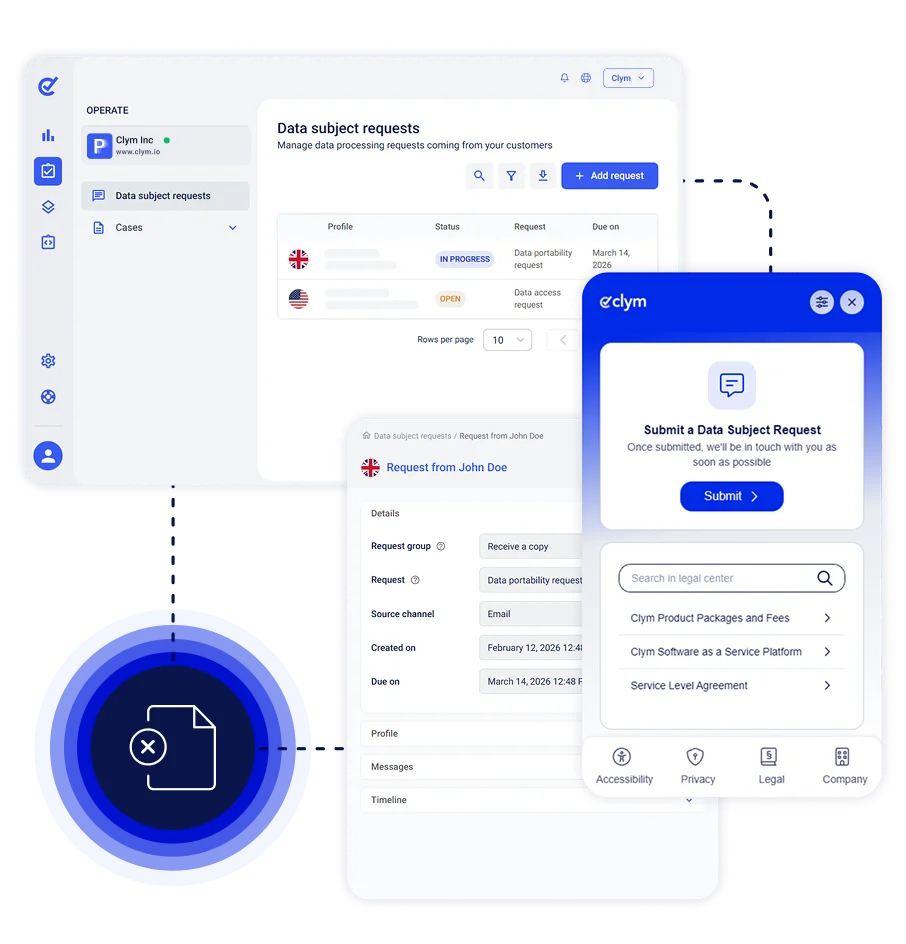
These processes form part of the broader CCPA consumer rights framework, which applies across all systems that may involve personal information.
How Clym supports Google Analytics Under CCPA
Google Analytics configuration depends on script execution, consent signals, and opt-out handling across the site.
Clym acts as a privacy operations layer that manages how Google Analytics runs within the tracking environment.
Key capabilities include:
Script execution control
Control when Google Analytics scripts load based on CCPA opt-out status or detected signals.
Google Consent Mode V2 integration
Clym integrates with Google Consent Mode V2 and updates consent signals (such as analytics_storage and ad_storage) automatically based on user preferences and Global Privacy Control. This allows Google Analytics to run in full, restricted, or denied mode depending on configuration.
Opt-out and GPC handling
Automatically detect CCPA opt-out choices and Global Privacy Control signals and apply predefined analytics logic.
Regional logic
Adjust analytics behavior by region, allowing Google Analytics to operate normally where CCPA does not apply.
Disclosure alignment
Keep privacy and cookie notices synchronized with actual analytics behavior.
DSR workflow integration
Include analytics-related data handling within consumer request processes.
Clym does not modify Google Analytics internally. Instead, it controls how Google Analytics executes, how Consent Mode signals are applied, and how tracking responds to CCPA requirements.
Common Google Analytics Configuration Pitfalls
Common issues include:
- Treating analytics as automatically exempt from CCPA
- Failing to adjust Google Analytics after a CCPA opt-out is recorded
- Ignoring Global Privacy Control (GPC) signals
- Retaining analytics data longer than necessary
- Implementing Google Analytics once and not reviewing configuration changes
Under CCPA, analytics may run by default, but problems arise when tracking behavior does not respond to valid opt-out signals or selling and sharing classifications.
Final note on managing Google Analytics under CCPA
For California-based businesses and organizations subject to CCPA, managing analytics and privacy controls is an ongoing operational responsibility rather than a one-time setup.
As tracking configurations, regulations, and enforcement expectations evolve, many teams find that fragmented tools make it harder to maintain consistent behavior across scripts, preference signals, and disclosures.
A common best practice is using a unified privacy operations platform that can centrally manage analytics script execution, respond to opt-out and signal frameworks such as Global Privacy Control, and keep tracking behavior aligned with notices and internal processes.
This approach reduces the need to coordinate multiple vendors and helps marketing and compliance teams work from the same operational framework.
Clym is designed to support this model by bringing consent management, signal handling, policy management, and request workflows into a single platform, allowing teams to manage Google Analytics as part of broader, ongoing privacy operations.
Frequently Asked Questions About Google Analytics and CCPA
CCPA applies to Google Analytics when the tool collects online identifiers or internet activity information that can be linked to a consumer or household.
Under CCPA, the focus is on how analytics data is collected, used, classified, and handled in response to opt-out signals and consumer rights.
Yes, Google Analytics may collect personal information under CCPA. This can include cookie identifiers, IP-derived location data, device information, and usage activity that can be linked to a consumer or household.
Google Analytics is not automatically considered selling or sharing under CCPA. Classification depends on how data is used, whether advertising features are enabled, and whether analytics supports cross-context behavioral advertising.
CCPA is primarily an opt-out law, not an opt-in consent framework. Google Analytics may run by default in many cases, but its behavior must adjust when a valid opt-out or Global Privacy Control signal is detected.
Google Consent Mode V2 allows websites to control how Google Analytics and advertising tags behave based on consent signals such as analytics_storage and ad_storage.
When signals are denied, cookies are restricted, although limited cookieless pings may still be transmitted.
Under CCPA, Consent Mode is often used to align analytics behavior with opt-out and GPC signals.
Under CCPA, script blocking and Google Consent Mode are two different ways to control how Google Analytics behaves after an opt-out or Global Privacy Control (GPC) signal.
Script blocking prevents the Google Analytics script from loading entirely. No tracking code executes, and no data is sent.
Google Consent Mode V2 allows the script to load but adjusts its behavior based on consent signals such as analytics_storage. When denied, cookies and identifiers are restricted, although limited cookieless pings may still be transmitted for measurement.
The key difference is that script blocking stops execution completely, while Google Consent Mode modifies how tracking operates without fully disabling the tag.
When a Global Privacy Control (GPC) signal is detected, Google Analytics must respond according to the organization’s opt-out logic. This may involve blocking the script entirely or updating Google Consent Mode signals to restrict identifiers and cookies.
Google Analytics can be stopped by blocking the analytics script from loading or by updating Google Consent Mode signals to restrict tracking. The method depends on how analytics is classified under selling or sharing analysis.
Analytics-related data should be evaluated as part of broader Data Subject Request workflows. Organizations typically assess whether analytics identifiers can be linked to the requesting individual and document how analytics data is handled in the response process.

Adam is the Head of Digital Marketing at Clym, where he leverages his diverse expertise in marketing to support businesses with their compliance needs and drive awareness about data privacy and web accessibility. As one of the company’s original team members, Adam has been instrumental in shaping its journey from the very beginning. When he’s not diving into marketing strategies, Adam can be found cheering on his favorite sports teams or enjoying fishing.