
Website accessibility statement guide
A website accessibility statement explains your WCAG standard, accessibility tools, and how to report issues. See what to include, legal rules, and a template.
A website accessibility statement explains your WCAG standard, accessibility tools, and how to report issues. See what to include, legal rules, and a template.
Scroll to the footer of almost any government website, and you'll find a small link labeled "Accessibility." Behind it sits a website accessibility statement: a public page that explains which standard the website follows, where it still falls short, and how people can get help when something doesn't work. You can read a short definition in our accessibility statement glossary entry.
These pages matter more in 2026 than they did a few years ago. The European Accessibility Act now applies to many private-sector services, US federal agencies must publish a statement, and 95.9% of the top one million home pages still had detectable WCAG failures in the WebAIM Million 2026 report. Your statement is often the first place a visitor with a disability looks when they hit a barrier.
In this guide, you'll learn what a website accessibility statement should include, when one is legally required, how to write yours with a free template, and how to keep it accurate after you publish it.
A website accessibility statement explains your accessibility standard, the tools you offer, and how users can report problems.
W3C treats three elements as essential: your commitment, the standard you follow, and contact details.
Statements are mandatory for US federal agencies, EU and UK public sector bodies, and in-scope EAA services.
US private businesses have no explicit statement requirement, but a statement shows users how to get help.
Your statement is a public claim, so never call your website fully compliant without evidence.
Review your statement after every audit, redesign, or new third-party tool, and at least once a year.
A website accessibility statement should include your commitment to accessibility, the standard you measure against, the accessibility tools available on your website, and how people can report an issue, with a response time. Depending on the rules that apply to you, add your conformance status, known limitations, a complaint route, and a review date. The W3C Web Accessibility Initiative treats commitment, standard, and contact information as the core elements.
Here's what each element looks like in practice.
Element | What to write | Why it matters |
|---|---|---|
Commitment | One or two sentences on why accessibility matters to you and who owns it. | Core W3C element. Shows a real person or team is accountable. |
Standard | The guideline you measure against, such as WCAG 2.2 Level AA. | Core W3C element. Required in US federal and EU public sector statements. |
Accessibility tools | The adjustments visitors can make through your accessibility widget, such as font size, contrast, text-to-speech, or pausing animations. | Helps visitors use your website right away while you keep improving it. |
Conformance status | Fully, partially, or not conformant, plus how you assessed it (self-evaluation, external audit, automated and manual testing). | Required in the EU model statement. Sets honest expectations. |
Known limitations | Specific barriers, why they exist, the alternative you offer, and when you plan to fix them. | Required in EU and UK public sector statements. Builds trust. |
Feedback mechanism | Email, phone, and a form, with an expected response time. | Core W3C element. Required for US federal, EU and UK public sector websites. |
Complaint or enforcement route | Who people can escalate to if your response isn't good enough. | Required for EU and UK public sector bodies and US federal agencies. |
Compatibility | Browsers and assistive technology you tested with. | Advisable under W3C guidance. |
Review date | "This statement was last reviewed on [date]." | Required for US federal and EU public sector statements. Signals freshness. |
As a practical benchmark, use WCAG 2.2 Level AA unless a requirement that applies to your organization names a different version or standard.
Plain language beats technical references. "Some older PDF reports don't work well with screen readers" helps a visitor far more than "Success Criterion 1.1.1 not met." W3C gives the same advice: describe the barrier the way a user would experience it.
The statement page itself also needs to be accessible. Publish it as an HTML page with clear headings, not only as a PDF, and keep sentences short.
It depends on who you are and where you operate. An accessibility statement is mandatory for US federal agencies and EU and UK public sector bodies, and the European Accessibility Act requires in-scope service providers to publish equivalent accessibility information. US private businesses have no explicit legal requirement to publish one.
Organization | Law or policy | Statement required? | What to know |
|---|---|---|---|
US federal agencies | Section 508 and OMB memo M-24-08 | Yes | OMB M-24-08 requires agencies to maintain a statement with standards applied, a feedback mechanism, complaint instructions and a last-updated date, as summarized by Section508.gov. |
Vendors selling to federal agencies | Section 508 through contract terms | Not as a statement | Agencies usually ask vendors for an Accessibility Conformance Report (VPAT) rather than a public statement. |
US state and local governments | ADA Title II web accessibility rule | Not explicitly | The rule sets WCAG 2.1 Level AA as the standard. After a 2026 extension, compliance dates are April 26, 2027 for entities serving 50,000 or more people and April 26, 2028 for smaller entities and special districts. |
US private businesses | No explicit requirement | Courts have applied the ADA to websites with increasing frequency, but there's no single nationwide technical standard under Title III, and outcomes vary by jurisdiction. | |
EU public sector bodies | Web Accessibility Directive (EU) 2016/2102 | Yes | The EU model accessibility statement requires compliance status, non-accessible content, preparation date, a feedback mechanism and the enforcement procedure. |
EU businesses offering in-scope services (for example, e-commerce, consumer banking, e-books, electronic communications) | European Accessibility Act, applying since June 28, 2025 | Yes, as required accessibility information | Service providers must explain how their services meet the accessibility requirements and make that information public in accessible formats. Microenterprises providing services are exempt. |
UK public sector bodies | Public Sector Bodies Accessibility Regulations 2018 | Yes | The UK government guidance requires a statement and expects WCAG 2.2 AA. |
Under the EAA, Article 13(2) of Directive (EU) 2019/882 requires service providers to prepare this information in line with Annex V, explain how the service meets the requirements, and keep it available for as long as the service operates. Annex V asks for it in your general terms and conditions or an equivalent document, which is why many businesses publish a statement and reference it in their terms. If you sell into several EU countries, check the national rules and penalties too; our guide to European Accessibility Act fines by country is a good starting point.
No. A statement doesn't make an inaccessible website accessible, and it isn't a legal shield. Plaintiffs filed 3,117 website accessibility lawsuits in US federal court in 2025, up 27% from 2024, according to Seyfarth Shaw's annual count.
A statement gives people a clear route to report a problem and get help, which can resolve issues before they escalate. You can read more about current trends in our overview of ADA web accessibility lawsuits in the USA.
Copy this accessibility statement template, replace everything in brackets, and delete anything that doesn't apply to you. It follows the same structure as the statements Clym's accessibility statement tool generates: your commitment and standard, the accessibility tools available on your website, your ongoing work, and how to report an issue.
[Organization name] is committed to providing a website that is accessible to the broadest possible audience, regardless of ability. We are actively working to make sure our digital content and services meet the accessibility standards outlined in the Web Content Accessibility Guidelines (WCAG) [2.2], Level AA, following the requirements of [the Americans with Disabilities Act (ADA) / the law that applies to you]. To support accessibility, our website includes an integrated accessibility widget that lets users customize their browsing experience to meet their needs. Features include options for:
These tools are designed to enhance usability and help individuals with visual, auditory, cognitive, or motor impairments access and interact with our website more effectively.
Ongoing commitment Accessibility isn't a one-time effort; it's an ongoing commitment. We continue to review our website and its features to improve usability and remove potential barriers. Our team works to keep updates, new content, and design changes in line with WCAG [2.2] Level AA and [applicable law].
Report an accessibility issue If you experience any difficulty using our website, encounter inaccessible content, or need information in an alternative format, please contact us:
We aim to respond to all accessibility inquiries within X business days.
Commitment and standard: tells visitors which guideline you measure against and which law shapes your approach. Pick the WCAG version and law that actually apply to you.
Accessibility tools: lists what visitors can adjust right now through your accessibility widget, such as font size, contrast, text-to-speech, and animations. Only list features your widget actually offers.
Ongoing commitment: shows the statement is maintained, not a one-off page. Back it up by reviewing the statement whenever you change your website.
Report an accessibility issue: gives people more than one way to reach you, plus a response time you can realistically meet.
The template covers what most private-sector websites need. If you're a US federal agency, an EU or UK public sector body, or a service provider under the EAA, add the sections your rules require:
Conformance status: fully, partially, or not conformant, and how you assessed it.
Known limitations: specific barriers, the alternative you offer, and when you plan to fix them. Example: "Some PDF reports published before 2024 do not work well with screen readers. Email us for an accessible version."
Complaints and enforcement: the body people can escalate to if your response isn't good enough.
Review date: "This statement was last reviewed on [date]."
EAA service information: a general description of the service, how to use it (including its accessibility features) and how it meets the accessibility requirements, typically by referencing EN 301 549 or WCAG. Link the statement from your general terms and conditions.
The best accessibility statement examples are specific, dated, and easy to act on. Here are two public-sector examples worth borrowing from.
GSA.gov: The GSA accessibility statement names its standards (Section 508 and WCAG 2.1 AA), offers both an informal email route and a formal complaint process with a 180-day filing window, and shows a last-updated date. Example: two escalation paths, clearly separated.
GOV.UK sample statement: The UK government sample statement opens with what users can actually do on the website, such as zooming to 400% without text spilling off screen, before listing non-accessible content by reason. Example: it leads with what works, then is honest about what doesn't.
The weakest examples tend to look alike: generic generator text, no known limitations, an email address nobody monitors, and no date. If a visitor can't tell whether your statement is current, they won't trust it.
Your accessibility statement is a public representation about your website, so it needs to match reality. Regulators treat accessibility claims like any other marketing claim: in April 2025, the Federal Trade Commission finalized an order requiring an accessibility widget vendor to pay $1 million over claims that its tool could make websites WCAG-compliant, which the FTC said were false, misleading, or unsubstantiated.
That case concerned a vendor's advertising, but the lesson applies to your own statement, too. An overclaiming statement undermines user trust and can become evidence that you knew about barriers but described them differently.
Claiming "fully compliant" or "100% accessible" without a recent audit to back it up.
Saying your website is "ADA certified." No official ADA certification exists for websites.
Treating your widget's features as proof that the website itself conforms. List what the widget lets visitors do, and describe your conformance work separately.
Leaving out known limitations when you know they exist.
Publishing generator text once and never updating it.
Safer wording sounds like "we aim to meet," "partially conformant," and "last tested on [date]." It's honest, and it still shows commitment.
Update your accessibility statement whenever something changes that affects accessibility, and review it at least once a year even if nothing has. The UK government's guidance sets that annual review as a minimum for public sector statements, and it's a sensible baseline for everyone else.
Trigger | What to update |
|---|---|
New audit or scan results | Conformance status, known limitations, and assessment date. |
Redesign or new page templates | Re-test, then review every section. |
New third-party tool (chat, booking, payments, video player) | Known limitations and compatibility. |
A reported issue gets fixed | Remove it from known limitations and update the review date. |
Launch in a new country or language | Translations, applicable laws, and the local complaint route. |
New WCAG version or legal requirement | The standard you follow and your conformance status. |
12 months with no changes | Review the whole statement and update the date. |
It also helps to name an owner. When a statement belongs to "everyone," it usually ends up belonging to no one. Regular accessibility testing and audits give that owner the evidence they need for each update.
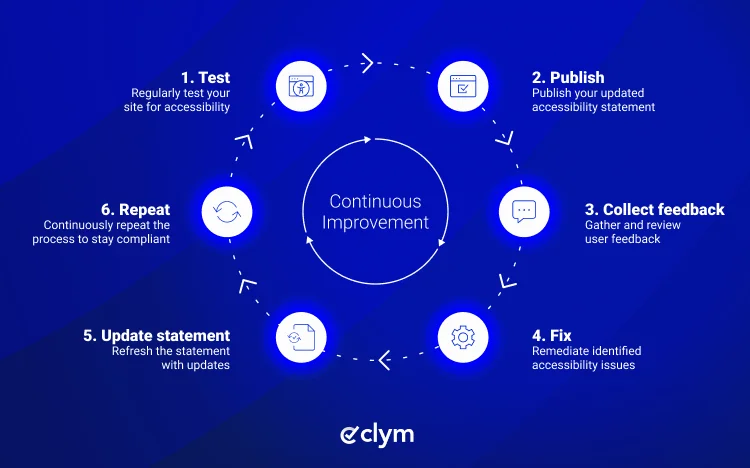
A contact email isn't a feedback process. More than 1 in 4 US adults has some type of disability, according to the CDC, so reports will come in. What matters is what happens next:
Make reporting easy. Link to a short form from your statement and footer, and offer email and phone too.
Acknowledge quickly. Tell people when they can expect a reply, and meet that time.
Triage. Record the page, the barrier, and who is affected, then prioritize by impact.
Offer an alternative now. Send an accessible version or help the person complete their task another way.
Fix and retest. Confirm the fix works with the assistive technology involved.
Update your statement. Remove the resolved limitation or add new ones you found.
Close the loop. Let the person who reported it know what changed.
Clym's accessibility issue reporting gives visitors a structured way to flag problems and gives your team a record of every report and response. For a step-by-step walkthrough, see our guide on how to report accessibility issues using a reporting tool.
An accessibility statement is a public page for website visitors, a VPAT is a detailed conformance report for buyers, and an accessibility policy is an internal document for your team. They overlap, but they answer different questions.
Document | Who reads it | What it does | Commonly required by |
|---|---|---|---|
Accessibility statement | Website visitors | Summarizes your standard, status, known limitations, and how to get help. | US federal agencies, EU and UK public sector bodies, EAA services |
Buyers and procurement teams | Reports conformance criterion by criterion for a specific product. | Public sector procurement, including Section 508 purchasing | |
Accessibility policy | Employees and leadership | Sets internal rules, roles and processes for accessibility. | Internal governance; some laws, such as Ontario's AODA, require written policies |
Link your accessibility statement from the footer of every page, using the same label ("Accessibility" or "Accessibility statement") across all of your websites. W3C also suggests linking it from help, about, and contact pages and your sitemap.
Publish it as an HTML page, with an optional PDF copy.
Translate it for every market where you operate, and keep the versions in sync.
Make it available from your accessibility widget, since that's where many visitors go when they hit a barrier.
For EAA services, link it from your general terms and conditions.
Clym brings the pieces of your statement together in one place. The Clym accessibility widget gives visitors tools like font size, contrast, text-to-speech, and animation controls, and your accessibility statement describes those same features, so the two never drift apart. Visitors can report issues through your Governance Portal, and you can publish the statement to your website, widget, and portal with translations in 23 languages kept in sync. Every change is versioned with dates, so you can always show what your statement said and when.
A website accessibility statement is short, but it does a lot of work. It tells visitors which standard you follow, where your website still falls short, and how to get help, and for federal agencies, EU and UK public bodies, and in-scope EAA services, it's a legal requirement.
The hard part isn't writing the first version. It's keeping it accurate as your website, your tools, and the rules change, avoiding overclaims, and connecting it to a real feedback process. Treat your statement as a living document with an owner and a review date, and visitors can trust it. The good news is you don't have to manage it alone.
It depends on your organization. US federal agencies, EU and UK public sector bodies, and businesses offering services covered by the European Accessibility Act must publish one. US private businesses have no explicit legal requirement, but a statement still helps visitors with disabilities find support and report problems quickly.
Start with your commitment and the standard you follow, such as WCAG 2.2 Level AA. Describe the accessibility tools visitors can use on your website, explain your ongoing work, and list several ways to report an issue with a response time. Add conformance status, known limitations, and a review date if your rules require them.
Update it whenever something changes that affects accessibility, such as a redesign, new audit results, a new third-party tool, or a fixed issue. Review it at least once a year even without changes. The UK government sets annual review as the minimum for public sector websites.
A generator can give you a first draft, but it can't know your website's real conformance status or limitations. Edit the output with your own testing results, named contacts, and response times. Then keep it updated, because a generated statement that never changes quickly becomes inaccurate and loses visitors' trust.
An accessibility statement is a short public page that tells website visitors about your accessibility standard, limitations, and support options. A VPAT, or Accessibility Conformance Report, is a detailed document for buyers that reports how a specific product meets each accessibility criterion, often during public sector procurement.
No. A statement doesn't make your website accessible and isn't a legal defense on its own. It can help by giving visitors a clear way to report barriers and get help, which may resolve issues early. Overclaiming conformance in a statement can work against you, so keep it accurate.

Compliance Content Manager | CIPP/E (IAPP) | CPACC (IAAP)
Alex is a Compliance Content Manager at Clym, where he researches and writes about everything related to data privacy and web accessibility compliance for businesses, helping them stay informed on their compliance needs and spreading awareness about making the web safer and more inclusive. When he's not writing about compliance, Alex has his nose in a book or is hiking in the great outdoors.